


The short answer to what is an SSL certificate is this: an SSL certificate is a digital document that proves control of a domain name (and, for OV and EV types, the identity of the organization as well) through the signature of a certificate authority, and that enables traffic between the browser and the server to be encrypted with the TLS protocol. As a result, passwords and card details typed into forms cannot be read in transit or altered without detection.
In brief: what you need to know about SSL certificates
- An SSL certificate is technically an X.509 certificate. Although the "SSL" name has stuck, today it is used not with SSL but with TLS 1.3 and TLS 1.2 connections.
- It does three core jobs: encryption, authentication and data integrity.
- DV, OV and EV certificates provide the same encryption strength. The difference between them is what gets verified before the certificate is issued.
- As of November 2026, the maximum validity of newly issued certificates is 200 days. This drops to 100 days on March 15, 2027 and to 47 days on March 15, 2029.
- Free SSL certificates obtained through Let's Encrypt and cPanel AutoSSL are DV certificates and are sufficient for most websites.
- HTTPS is a lightweight Google ranking signal. Its real impact is visitor trust and the removal of browser warnings.
What changed in 2026? Under CA/B Forum rules, certificates issued on or after March 15, 2026 can be valid for no more than 200 days (the previous limit was 398 days). Let's Encrypt's default certificate lifetime will drop from 90 days to 64 days on February 10, 2027. These shorter lifetimes make automated renewal a practical necessity. Google has also announced that it plans to start having Chrome ask users for permission by default before opening sites over HTTP in fall 2026.
What is an SSL certificate? How SSL, TLS and HTTPS relate
A browser has two questions: "Does the server I am talking to really belong to this domain?" and "Can anyone else read the data between us?" The certificate answers the first question, and the TLS protocol uses the information in the certificate to answer the second.
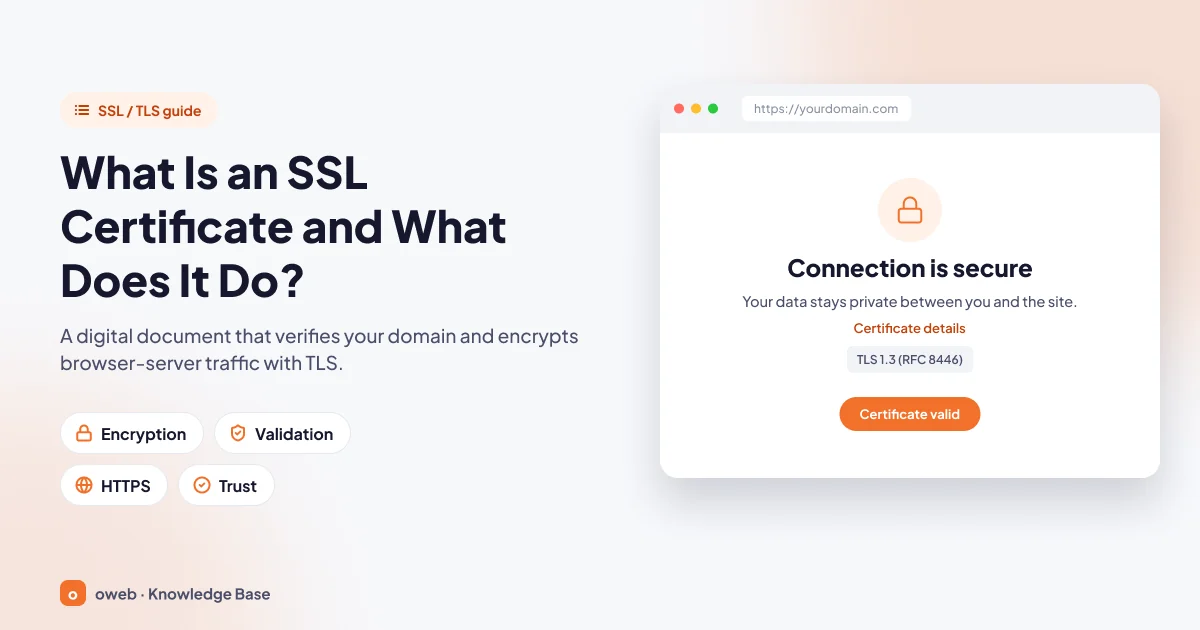
According to RFC 5280, a certificate is a data structure that binds a public key to a specific subject (for example, yourdomain.com); a trusted certificate authority (CA) confirms this binding by signing it. For the hosting panel side of the topic, you can also refer to the SSL guide in the cPanel documentation.
What is SSL, what is TLS? Why do people still say "SSL"?
SSL (Secure Sockets Layer) is the predecessor of TLS (Transport Layer Security). Every version of SSL has been retired because of security flaws: SSL 2.0 was prohibited by RFC 6176, and SSL 3.0 was deprecated by RFC 7568. RFC 8996, published in March 2021, formally deprecated TLS 1.0 and TLS 1.1 as well.
TLS 1.3, published in August 2018 as RFC 8446, is the current version and, according to MDN, also the most widely used one. TLS 1.2 is still used on some sites. TLS 1.0 and 1.1 should no longer be used.
Why hasn't the name changed? The industry has been used to saying "SSL certificate" for years; even the menu in cPanel is still called "SSL/TLS". The product you buy is called an SSL certificate, but your server uses it in TLS connections.
What is HTTPS? How is it different from HTTP?
HTTPS is the TLS-encrypted version of HTTP, the protocol that carries web pages. Over an HTTP connection, data travels as plain text; someone on the same Wi-Fi network, the internet service provider or any device in between can read or modify this traffic. HTTPS uses port 443 by default, while HTTP uses port 80.
What information does a certificate contain?
An X.509 v3 certificate contains the protected domain names (the Subject and SAN fields), the authority that signed the certificate (Issuer), the validity start and end dates (notBefore, notAfter), the server's public key, a unique serial number and the CA's digital signature.
How does SSL work? The HTTPS connection step by step
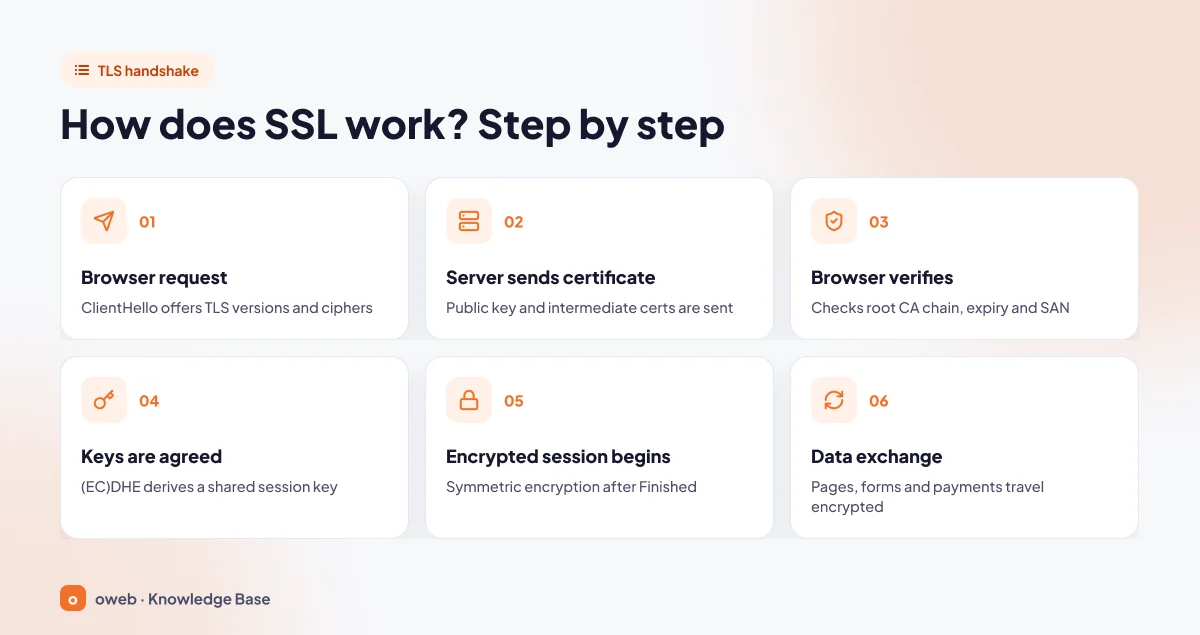
Establishing an HTTPS connection is called the "handshake" (TLS handshake). In TLS 1.3, a full handshake completes in a single round trip (1-RTT). The simplified steps are as follows:
- Browser request: The browser connects to https://yourdomain.com and announces the TLS versions and encryption methods it supports (ClientHello).
- Server sends the certificate: The server announces its choice and sends the certificate containing its public key, together with the intermediate certificates (ServerHello and Certificate).
- Browser verifies the certificate: It checks whether the certificate chains to a trusted root certificate, whether it is within its validity period and whether the visited domain name appears in the SAN field.
- Keys are established: Using (EC)DHE key exchange, the two sides generate a shared session key that is never sent over the network.
- Encrypted session begins: The two sides confirm with "Finished" messages that the handshake was not tampered with, and application data begins to flow using symmetric encryption.
- Data exchange: Page content, form data and payment details are transmitted encrypted and with their integrity protected.
The steps are given in logical order for clarity. In TLS 1.3, the key share actually happens in the first two messages (ClientHello and ServerHello), and the certificate is sent encrypted with these keys; that is why the handshake completes in a single round trip.
Public key, private key and session key
The certificate contains only the public key, which anyone can see. The corresponding private key stays on the server and is never shared. During the handshake, the server proves that it is the genuine owner of the certificate by producing a signature with this private key.
The key that encrypts the page data, however, is the session key, which is generated anew for each connection. Because TLS 1.3 removed static RSA and static DH key exchange, all public-key-based key exchanges provide forward secrecy. In other words, even if the private key is compromised in the future, a previously recorded session established this way cannot be decrypted with that key.
Do not send your private key file (.key) by email, attach it to a support ticket or keep it in a publicly accessible folder. If you suspect the key has leaked, have the certificate reissued with a new key and have the old one revoked.
Certificate authorities and the chain of trust
Your browser cannot recognize the certificate of every site in the world; instead, it trusts a limited number of root certificates that ship with the operating system and the browser. Root certificate authorities usually issue certificates to sites not directly but through intermediate certificates. RFC 5280 calls this structure a certification path: the chain starts at a trusted root, passes through intermediate certificates and ends at your site's certificate.
That is why you also need to install the intermediate certificates (CA bundle) during setup; if the chain is incomplete, some devices will show an "untrusted authority" error.
What does an SSL certificate do?
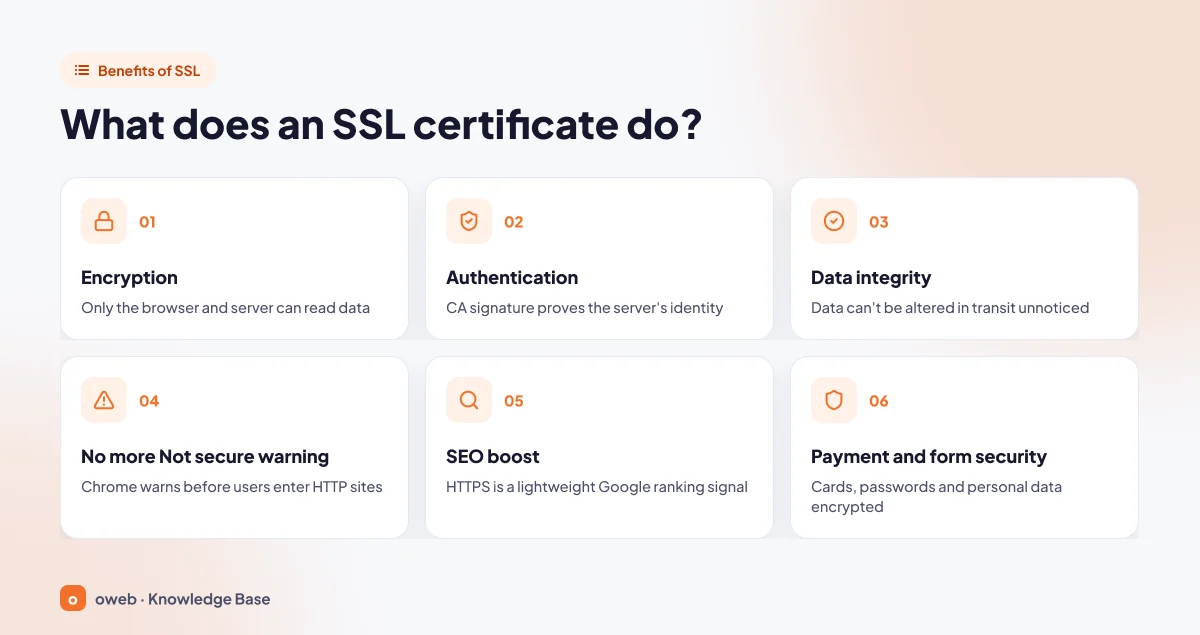
The certificate's three core functions come from the security goals in RFC 8446; on top of these come three outcomes that directly benefit the site owner.
Encryption, authentication and data integrity
- Encryption: Once the connection is established, the data sent can be read only by the two endpoints, that is, the visitor's browser and your server.
- Authentication: The CA signature proves that the server holds a valid certificate for yourdomain.com and its private key. An attacker who redirects traffic to their own server has neither a valid certificate nor the private key, so the browser drops the connection and shows a "Your connection is not private" warning; if the site uses HSTS, the visitor cannot bypass this warning.
- Data integrity: Data cannot be altered in transit without detection. Over HTTP, a device in the middle can inject ads or malicious code into the page; with TLS, such a modification is detected.
Getting rid of the "Not secure" warning
Chrome shows a "Not secure" warning in the address bar on pages that do not use HTTPS. According to the Chrome help page, the connection in this case is not private, and only the site owner can fix the problem by enabling HTTPS. In 2025, Google announced that it plans to turn on the "Always Use Secure Connections" setting for public sites by default for all users with Chrome 154 (fall 2026); when this setting is on, Chrome shows a warning screen before opening a site over HTTP.
The impact of HTTPS on SEO
Exaggerated claims about the impact of HTTPS on SEO are common. Google announced on August 7, 2014 that it had started using HTTPS as a ranking signal and described it as a "very lightweight signal". Although the current page experience documentation lists HTTPS on its checklist, it states that of these elements, the ranking systems use only Core Web Vitals. In short, HTTPS alone will not push you to the top of the rankings, but its absence will cost you visitors.
Protecting payment and form pages
Any site with member logins, contact forms, a shopping cart or checkout steps should use HTTPS. Data protection laws and card payment standards require many technical and administrative measures; HTTPS is only one of them and does not on its own ensure legal compliance.
The padlock or secure connection icon shows that the connection is encrypted, not that the site is honest. Phishing sites can also use valid DV certificates, which are easy to obtain. Before entering card details on a site, check the domain name letter by letter.
What are the types of SSL certificates?
SSL certificate types are classified along two independent axes: what is verified (validation level) and which addresses are protected (coverage). For example, you can get a certificate that is both OV and wildcard.
By validation level: the difference between DV, OV and EV SSL
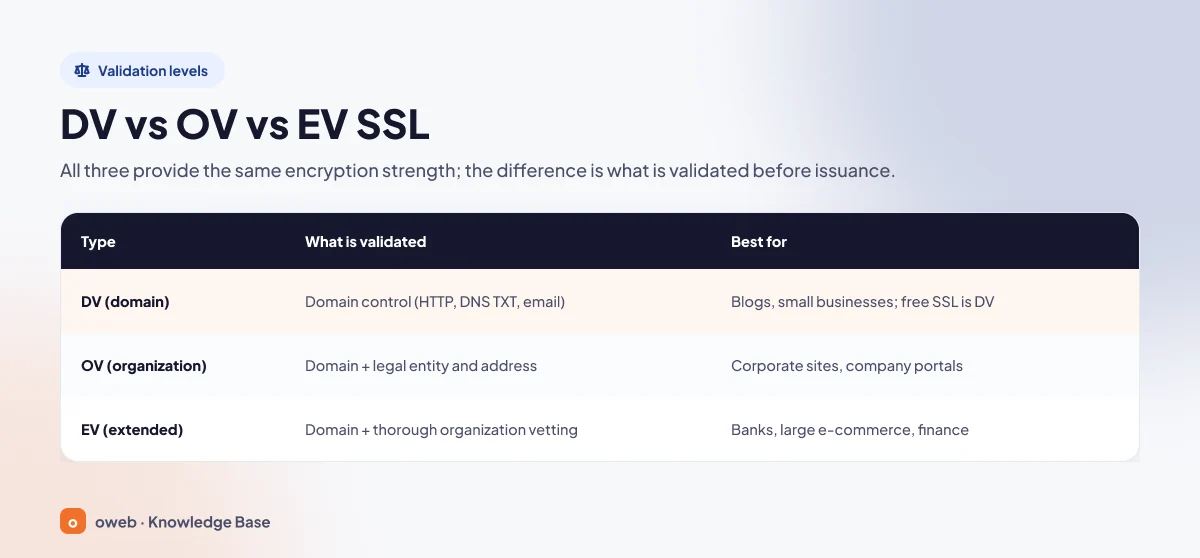
The difference between DV, OV and EV SSL lies not in encryption strength but in the checks the certificate authority performs on the applicant.
| Type | What is verified | Who it is for |
|---|---|---|
| DV (Domain Validation) | Only control over the domain name: via an HTTP file, a DNS TXT record or email | Blogs, personal sites, small businesses. Certificates obtained through Let's Encrypt and cPanel AutoSSL are of this type. |
| OV (Organization Validation) | The domain name plus the organization's legal existence and address | Corporate websites, company portals |
| EV (Extended Validation) | The domain name plus comprehensive legal, physical and operational verification of the organization | Banks, large e-commerce and financial institutions |
Sites with EV certificates used to show a green bar and the company name in the address bar; major browsers have removed this display, and organization details now appear only in the certificate details. Choose OV or EV when corporate policy or an audit requires the organization's identity to be included in the certificate. Self-signed certificates, which no CA has signed, are suitable only for test environments; browsers do not trust them.
By coverage: single-domain, wildcard and multi-domain SSL
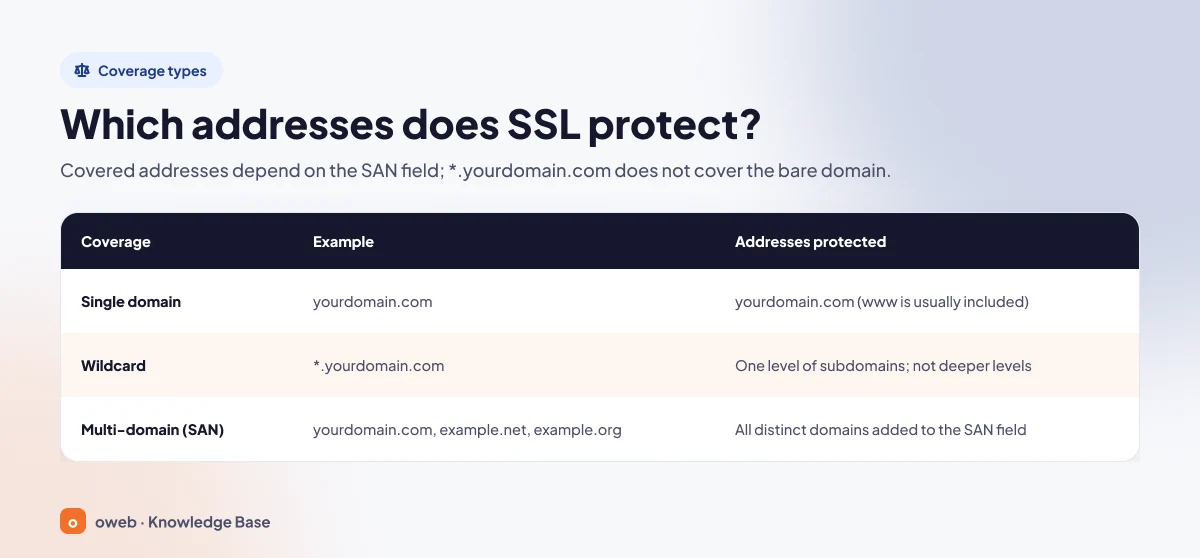
Which addresses a certificate protects depends on the names listed in its SAN field.
| Coverage | Example | Addresses protected |
|---|---|---|
| Single domain | yourdomain.com | yourdomain.com; www.yourdomain.com is usually added as a SAN as well |
| Wildcard | *.yourdomain.com | Single-level subdomains such as blog.yourdomain.com and shop.yourdomain.com; a.b.yourdomain.com is not covered |
| Multi-domain (SAN/UCC) | yourdomain.com, example.net, example.co.uk | All the different domain names added to the certificate's SAN field |
What is a wildcard SSL, and what does it not cover?
Under CA/B Forum rules, a wildcard SSL certificate is one that carries at least one name in its SAN field that starts with "*." immediately followed by a fully qualified domain name. The asterisk stands in for a single dot-separated part (label) of the domain name. *.yourdomain.com is valid for www.yourdomain.com and blog.yourdomain.com, but on its own it is valid neither for test.blog.yourdomain.com nor for the bare yourdomain.com. Check whether the bare domain is also listed in the SAN field. To combine different extensions (such as .com and .co.uk) in a single certificate, you need a multi-domain certificate, not a wildcard.
The difference between free SSL and paid SSL
When people think of free SSL, Let's Encrypt is the first name that comes to mind. According to the Let's Encrypt FAQ, its certificates are free; Let's Encrypt issues only DV certificates, has no plans to issue OV or EV certificates and supports wildcard certificates through DNS-01 validation. The AutoSSL feature in cPanel also uses Let's Encrypt as the default provider on new installations and renews certificates automatically.
| Criterion | Free (Let's Encrypt, AutoSSL) | Paid certificate |
|---|---|---|
| Validation level | DV only | DV, OV or EV |
| Encryption strength | Same | Same |
| Wildcard | Yes (with DNS-01 validation) | Yes |
| Validity | 90 days by default (as of November 2026) | Up to 200 days (as of November 2026) |
| Renewal | Automatic (ACME client or AutoSSL) | Manual reissue and installation if there is no automation |
| Support | Community and hosting provider | Certificate provider's support |
For a blog, a showcase website or a small e-commerce site, a free DV certificate is technically sufficient. A paid certificate makes sense when the organization's details need to appear in the certificate or when you want support from the provider. If you need a paid certificate, you can check out Oweb's SSL certificate page.
How long is an SSL certificate valid?
Certificate lifetimes are set by the CA/B Forum, which is made up of browser vendors and certificate authorities. The schedule in the Baseline Requirements is as follows:
| Issuance date | Maximum certificate validity | Domain validation reuse period |
|---|---|---|
| On or after March 15, 2026 | 200 days | 200 days |
| On or after March 15, 2027 | 100 days | 100 days |
| On or after March 15, 2029 | 47 days | 10 days |
For certificates issued before March 15, 2026, the maximum validity was 398 days. Why are lifetimes getting shorter? The shorter the window during which a misissued certificate or one with a compromised private key can be used, the lower the risk. The practical consequence is this: packages sold as "2-year" or "3-year" no longer mean a single certificate, but certificates that are reissued repeatedly throughout the subscription period.
The Let's Encrypt schedule is also set. As of November 2026, default certificates are valid for 90 days, and renewing them every 60 days is recommended. According to the Let's Encrypt announcement, the default lifetime of newly issued certificates will drop to 64 days on February 10, 2027 and to 45 days on February 16, 2028. Optional short-lived 6-day certificates have been available since January 2026.
Managing renewals by noting them in a calendar does not fit the 47-day era. Set up automatic renewal with AutoSSL, Certbot or another ACME client. If you tie renewal to a fixed number of days, renew when roughly two thirds of the certificate's lifetime has passed, as Let's Encrypt recommends.
How do you get and install an SSL certificate?
How you get a certificate depends on your hosting environment. If your hosting panel offers AutoSSL or Let's Encrypt, the CSR, validation and installation steps are done automatically; all that is left for you is the backup, DNS check and testing steps. The list below shows the general workflow for a manually installed paid certificate.
- Take a backup: Always back up your server configuration files, your .htaccess file and your DNS records before making changes.
- Check your DNS records: For HTTP validation, the A records of your domain and its www address must point to the server where you will install the certificate. If there is an AAAA record, it must point to the same server as well; if it is wrong, fix or delete it, because validation may also be attempted over IPv6. If your domain has a CAA record, it must authorize the authority that will issue the certificate; otherwise the certificate will not be issued.
- Choose the type: Decide on the validation level (DV, OV, EV) and coverage (single, wildcard, multi-domain).
- Generate a CSR and private key: For paid certificates, a certificate signing request (CSR) is generated. The private key stays on the server.
- Complete validation: For DV, domain control is verified via an HTTP file, a DNS TXT record or email. For OV and EV, organization documents are added to this.
- Install: Upload the certificate, the intermediate certificates and the private key to the server.
- Test: Open the site in different browsers and apply the checking methods below.
A CAA record (RFC 8659) specifies which authorities can issue certificates for your domain. For example, a record that authorizes only Let's Encrypt looks like this (details in the Let's Encrypt CAA documentation):
yourdomain.com. IN CAA 0 issue "letsencrypt.org"What is a CSR and how do you create one?
A CSR (Certificate Signing Request) is a request sent to the certificate authority that contains your public key and your domain details. Hosting panels generate the CSR in their own interface. If you prefer the command line, you can create one with OpenSSL as follows:
openssl req -new -newkey rsa:2048 -nodes \
  -keyout yourdomain.com.key -out yourdomain.com.csr \
  -subj "/CN=yourdomain.com" \
  -addext "subjectAltName=DNS:yourdomain.com,DNS:www.yourdomain.com"

chmod 600 yourdomain.com.key
The -subj and -addext options (OpenSSL 1.1.1 and later) write the domain names directly into the command; if you do not use them, the command prompts you one by one for details such as country, organization and Common Name (domain name). The -nodes option writes the private key without a passphrase (in OpenSSL 3, -noenc does the same job), so use chmod 600 to make the file readable only by its owner. Send the resulting .csr file to the provider and keep the .key file safely on the server.
Installation methods
The methods below are listed from easiest to most advanced; if you use shared hosting, the first method is usually enough.
cPanel: free certificates with AutoSSL
On accounts that use cPanel, the easiest route is AutoSSL. AutoSSL automatically issues certificates for domains and subdomains that pass the domain control validation (DCV) check; as of November 2026, it tries to renew Let's Encrypt certificates 29 days before they expire. To see the status:
- In cPanel, go to Home » Security » SSL/TLS Status.
- Use the "Has AutoSSL Problems", "Expiring Soon" or "Expired" filters to pick out problem addresses; use "Show Unsecured Domains" to list addresses without a certificate.
- If your hosting provider has enabled AutoSSL for your account, you can run AutoSSL again manually from this screen after fixing your DNS.
For details, see the cPanel SSL/TLS Status documentation. A certificate you have purchased is installed through cPanel's SSL/TLS interface by filling in the certificate, private key and CA bundle fields.
Plesk and other panels
Plesk and other popular panels also offer free certificates and automatic renewal with Let's Encrypt. Because menu names change between versions, follow up-to-date sources such as the Plesk documentation.
VPS or server: installing with Certbot
On an Apache or Nginx server that you manage yourself, you can use Certbot, one of the ACME clients recommended by Let's Encrypt. After backing up your configuration files:
# For Apache
sudo certbot --apache -d yourdomain.com -d www.yourdomain.com

# For Nginx
sudo certbot --nginx -d yourdomain.com -d www.yourdomain.com

# Test that automatic renewal works
sudo certbot renew --dry-run
Certbot writes the certificate files to /etc/letsencrypt/live/yourdomain.com/. HTTP-01 validation is performed over port 80 using a file under the /.well-known/acme-challenge/ path, so this port must be open. According to the Let's Encrypt challenge types documentation, the DNS-01 method, that is, an _acme-challenge TXT record, is required for wildcard certificates.
If you define the certificate manually in Apache, mod_ssl must be enabled (Debian/Ubuntu: sudo a2enmod ssl). According to the Apache mod_ssl documentation, from Apache 2.4.8 onward the full chain file is given to the SSLCertificateFile directive; SSLCertificateChainFile has been deprecated since that version. The virtual host definition looks like this (if you got the certificate from a CA, change the paths to point to those files):
<VirtualHost *:443>
    ServerName yourdomain.com
    ServerAlias www.yourdomain.com
    SSLEngine on
    SSLCertificateFile    /etc/letsencrypt/live/yourdomain.com/fullchain.pem
    SSLCertificateKeyFile /etc/letsencrypt/live/yourdomain.com/privkey.pem
</VirtualHost>
After making the change, test the configuration and reload the server:
sudo apachectl configtest
sudo systemctl reload apache2   # RHEL/AlmaLinux: sudo systemctl reload httpd
In Nginx, the equivalents are the ssl_certificate (pointing to the fullchain.pem file) and ssl_certificate_key (privkey.pem) directives. Test first with sudo nginx -t, then reload with sudo systemctl reload nginx.
If you use Cloudflare
Among Cloudflare's SSL/TLS encryption modes, "Flexible" encrypts the connection between the visitor and Cloudflare but leaves the connection between Cloudflare and your server unencrypted. If the server also has an HTTPS redirect, a loop occurs. Install a valid certificate on your server and set the mode to "Full (strict)"; details are in the Cloudflare documentation.
What to do after installation
Having a certificate installed does not mean the site has fully moved to HTTPS. If the steps below are skipped, the site may still open over HTTP, or some pages may show a security warning.
1. Permanent redirect from HTTP to HTTPS
Google recommends server-side permanent redirects (301 or 308) and states that these redirects do not cause a loss of ranking value. On hosting that uses Apache, you can add the following rule after backing up your .htaccess file:
RewriteEngine On
RewriteCond %{HTTPS} off
RewriteRule ^(.*)$ https://%{HTTP_HOST}%{REQUEST_URI} [L,R=301]
If the site is behind a CDN or reverse proxy, the server may see the request as HTTP, and this rule will create a loop. For this case and panel-based methods, see our guide to redirecting HTTP to HTTPS. If your WordPress site shows a "too many redirects" error, our WordPress ERR_TOO_MANY_REDIRECTS fix article will help you step by step.
2. Clean up mixed content
Mixed content occurs when a page loaded over HTTPS pulls some files over HTTP. According to MDN, browsers automatically upgrade image, audio and video requests to HTTPS, while blocking resources such as scripts, stylesheets, iframes and fonts.
The cleanest solution is to replace the "http://" addresses in the database and the theme with "https://". In WordPress, first update the "WordPress Address (URL)" and "Site Address (URL)" fields under Settings » General to https. Change these fields only after https://yourdomain.com opens without a certificate error; otherwise you may lose access to the admin dashboard. If the fields are grayed out, the addresses are defined by the WP_HOME and WP_SITEURL constants in wp-config.php; make the change there after backing up the file.
Next, back up the database and run WP-CLI's search-replace command in dry-run mode first. WP-CLI correctly updates the serialized data stored by plugins; a replacement done directly with SQL can corrupt this data. The guid column, which holds the permanent identifier of posts, should not be changed:
wp db export backup.sql
wp search-replace 'http://yourdomain.com' 'https://yourdomain.com' --skip-columns=guid --dry-run
wp search-replace 'http://yourdomain.com' 'https://yourdomain.com' --skip-columns=guid
If your site is also used with www, run the same commands for http://www.yourdomain.com as well.
During the transition, you can also use the Content-Security-Policy: upgrade-insecure-requests header, which upgrades all requests on the page to HTTPS. On hosting that uses Apache, add it as follows after backing up your .htaccess file (the mod_headers module is required):
<IfModule mod_headers.c>
Header always set Content-Security-Policy "upgrade-insecure-requests"
</IfModule>
If your site already sends a Content-Security-Policy header, add the upgrade-insecure-requests directive to the existing header instead of sending a second one. This header is no substitute for fixing http:// addresses: a resource that has no HTTPS version still cannot load after being upgraded.
To protect your WordPress site beyond HTTPS, also follow the steps in our WordPress security guide.
3. Enable HSTS carefully
The HSTS (Strict-Transport-Security) header tells the browser that from now on the site should be opened only over HTTPS and that HTTP attempts should be upgraded to HTTPS automatically. A header sent in HTTP responses is ignored by the browser. The header itself takes the form Strict-Transport-Security: max-age=300; the duration is in seconds.
On hosting that uses Apache, add the header in stages after backing up your .htaccess file. Use only one Header line at each stage:
<IfModule mod_headers.c>
# Stage 1: try it first with a short duration (5 minutes)
Header always set Strict-Transport-Security "max-age=300"

# Stage 2: if there are no problems, increase the duration to one year
# Header always set Strict-Transport-Security "max-age=31536000"

# Stage 3: after confirming that all subdomains work over HTTPS
# Header always set Strict-Transport-Security "max-age=31536000; includeSubDomains"
</IfModule>
In Nginx, the same header is added to the server block listening on port 443; then test the configuration with sudo nginx -t and reload it (Nginx add_header documentation):
add_header Strict-Transport-Security "max-age=300" always;includeSubDomains forces all subdomains onto HTTPS; a subdomain without a certificate becomes inaccessible. Because browsers remember the max-age duration, this is hard to undo. To apply for the preload list, the header must include max-age of at least 31536000 along with both the includeSubDomains and preload directives, and the HTTP address must redirect to HTTPS on the same domain. Since removal from the list can take months, do not take this step without checking all of your subdomains.
4. Search engine adjustments
- Make sure you have a property in Google Search Console that covers the HTTPS address, and resubmit your sitemap with HTTPS URLs.
- Update canonical tags, hreflang and internal links to HTTPS; avoid redirect chains.
- The Change of Address tool is not needed for this migration; keep the redirects in place for at least a year.
How do you check an SSL certificate?
Check your certificate after installation and around renewal periods in the following ways:
- In the browser: Click the icon on the left of the address bar and open the certificate details from the connection information. You will see who the certificate was issued to and by which CA, its expiry date and the names in the SAN field.
- With an online tool: Enter your domain name into Oweb's free SSL checker to quickly check the status of your certificate.
- From the command line: With OpenSSL, you can read the certificate the server sends directly. The command below shows the subject, issuer, dates and SAN names (the -ext option works in OpenSSL 1.1.1 and later).
- From the panel: The SSL/TLS Status screen in cPanel lists domains whose certificates are about to expire and those with AutoSSL errors. Detailed logs of AutoSSL errors are kept on the server; on shared hosting, your hosting provider can look at them.
openssl s_client -connect yourdomain.com:443 -servername yourdomain.com </dev/null \
  | openssl x509 -noout -subject -issuer -dates -ext subjectAltName
Certificates issued by trusted CAs are recorded in Certificate Transparency logs; by searching these logs, you can see whether a certificate has been issued for your domain without your knowledge.
Common SSL errors and how to fix them
When there is a certificate problem, Chrome shows a warning titled "Your connection is not private" with an error code below it. The code largely reveals the source of the problem.
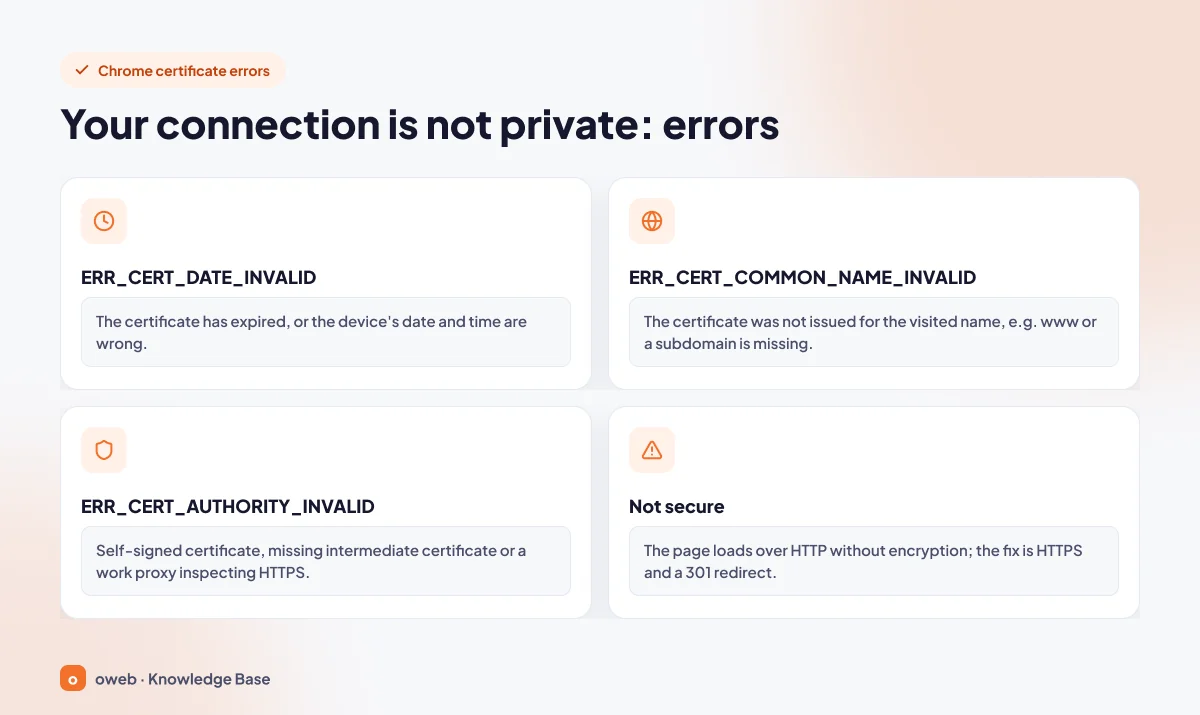
| Error | Likely cause | Fix |
|---|---|---|
NET::ERR_CERT_DATE_INVALID | The certificate has expired, or the device's date and time are wrong | Renew the certificate and check automatic renewal; if it happens on a single device, correct its clock |
NET::ERR_CERT_COMMON_NAME_INVALID | The certificate was not issued for the name being visited (e.g. www or a subdomain is missing) | Reissue the certificate with the missing name added to the SAN field |
NET::ERR_CERT_AUTHORITY_INVALID | A self-signed certificate or a missing intermediate certificate | Get a certificate from a trusted CA and install the CA bundle file |
ERR_SSL_VERSION_OR_CIPHER_MISMATCH | The server and browser cannot agree on a common TLS version or encryption algorithm (cipher suite) | Check that TLS 1.2 and TLS 1.3 are enabled on the server and that the correct certificate is being served |
ERR_TOO_MANY_REDIRECTS | Usually an HTTPS redirect loop (e.g. Cloudflare Flexible combined with a server redirect) | Handle the redirect in one place only and switch Cloudflare to Full (strict) mode |
| "Not secure" | The page is opened over HTTP, and the connection is not encrypted | Enable HTTPS and set up a 301 redirect from HTTP |
If the error appears only on an office network, the problem may not be with the site. According to Chrome Help, corporate security software and proxy servers that inspect HTTPS traffic can also cause the NET::ERR_CERT_AUTHORITY_INVALID error. Check by opening the site from another network.
Frequently asked questions
Is an SSL certificate mandatory?
Your site will technically open without HTTPS; however, this is a practical requirement more than a uniform legal one. Chrome shows a warning before opening HTTP sites when the "Always Use Secure Connections" setting is on, and HTTPS is a basic technical measure for any page that collects personal data, passwords or card details.
Is free SSL secure?
Yes. A DV certificate obtained through Let's Encrypt or AutoSSL provides the same encryption as a paid certificate; the difference lies in the validation level and support.
Is Let's Encrypt trustworthy?
Let's Encrypt is a certificate authority that issues free certificates and is recognized by common browsers and operating systems. According to its FAQ, it issues only DV certificates; that is, it verifies your control over the domain name, not your organization's identity.
How long does it take for an SSL certificate to become active?
DV certificates are issued as soon as domain validation is completed; if your DNS records are correct, this usually takes very little time. For OV and EV certificates, the process takes longer because organization documents need to be reviewed.
Why does my site still show "Not secure" after installing SSL?
There are two common reasons: the HTTP address has not been redirected to HTTPS, or the page is still loading some files over http:// (mixed content). First set up the 301 redirect; you can follow our HTTPS redirect guide for this. Then apply the mixed content steps above and check the console in the browser's developer tools for any remaining warnings.
What happens if an SSL certificate expires?
Visitors are met with a NET::ERR_CERT_DATE_INVALID warning and may not trust the site. If the same certificate is also used on a mail server or an API endpoint, email clients and API connections will throw errors as well. Automatic renewal largely eliminates this risk.
Which type of SSL does an e-commerce site need?
In terms of encryption, a DV certificate is sufficient; DV, OV and EV provide the same encryption strength. Choose OV or EV if corporate policy, a business partner or an audit requires the organization's identity to appear in the certificate. Also check the security requirements of your payment provider separately.
What is the difference between SSL and TLS?
SSL is the old, deprecated protocol; TLS is its current successor. The product called an "SSL certificate" is used today in TLS 1.2 or TLS 1.3 connections.
Does a wildcard SSL cover the www address?
*.yourdomain.com covers www.yourdomain.com because www is a single-level subdomain. However, on its own it does not cover the bare yourdomain.com; that name must be added to the SAN field separately.
Do I need an SSL certificate for email?
If your email clients connect to the mail server over an encrypted connection, the server name they connect to must have a valid certificate; otherwise the apps will show a certificate warning. In your connection settings, use the server name covered by the certificate. Encrypted connections typically use port 993 for IMAP, 995 for POP3 and 465 (or 587 with STARTTLS) for SMTP submission (RFC 8314).
Conclusion
An SSL certificate is a fundamental security layer that encrypts the connection between your visitor and your server, verifies that the server belongs to that domain and prevents data from being altered in transit without detection. Today, the real task is choosing the right type, moving fully to HTTPS and automating renewal in the face of shrinking lifetimes. For most sites, a free DV certificate, a proper 301 redirect and cleaned-up mixed content make a solid start.
If you get stuck on any step during installation or renewal, Oweb customers can open a support ticket to get help from the technical team. Including your domain name and the error code in the ticket speeds up the resolution.
