GPU Dedicated Server 0
0 (850) 303 31 32 ISO Certificate Blog FAQ Contact
TRY: 1.00 TL
USD: 50.38 TL
Support Ticket Deals
0 Register
Oweb Bulut İnternet Hizmetleri A.Ş. Joint-Stock Company
0 (850) 303 31 32
Beşiktaş / ISTANBUL
Maslak Tax Office - 6341135657
Commercial Info Bank Accounts Legal Agreements
About the Company Everything you need to know
GPU Dedicated Server

NVIDIA GPU Dedicated Server Rental

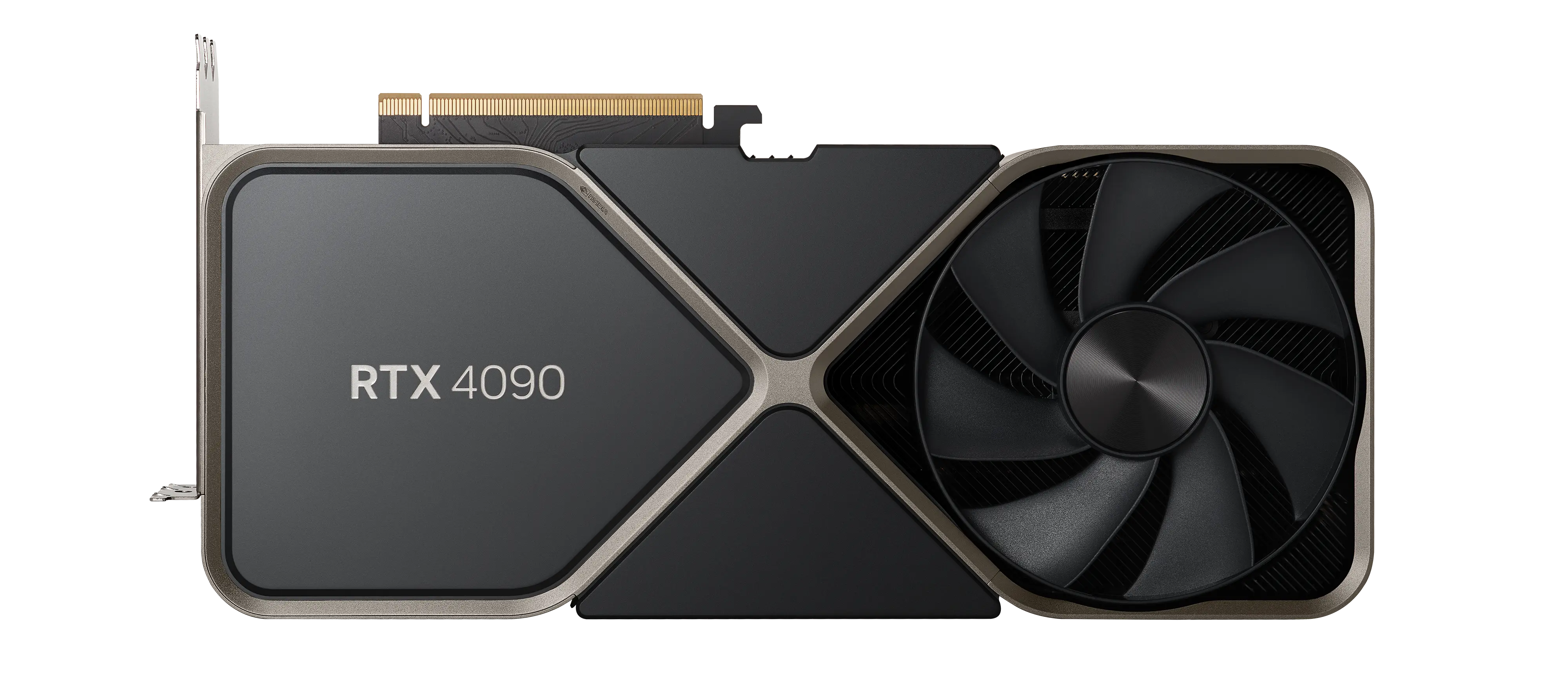
Physical GPU servers equipped with the NVIDIA RTX 4090 graphics card, with resources reserved for you alone, for AI, deep learning, rendering and other compute-heavy workloads.

  • NVIDIA RTX 4090 24GB VRAM
  • High-Frequency CPU
  • NVMe SSD Storage
  • Ready for AI and Deep Learning
Server Overview Istanbul
  • Graphics cardNVIDIA RTX 4090 · 24GB GDDR6X VRAM
  • SoftwareDriver, CUDA and cuDNN installed
  • Data centerMARS · TIER III
  • NetworkMulti-carrier, unlimited traffic
  • ProtectionISP + Voxility Firewall
  • AccessRoot / Administrator · IPMI/KVM
99.9% Network uptime guarantee
NVMe Disk Storage
GPU Hardware Acceleration
99.9% Uptime Guarantee
1:1 Dedicated Resources
Packages

Our GPU Dedicated Server Packages

Explore our packages built around the NVIDIA RTX 4090 graphics card, or request a quote if the standard packages are not enough.

GPU Acceleration NVIDIA CUDA Support
NVIDIA GeForce RTX 4090 graphics card
NVIDIA RTX 4090 24GB GDDR6X VRAM
Standard Package

OGPU - 001

Equipped with an NVIDIA RTX 4090 graphics card, a high-frequency CPU and Gen4 NVMe SSD storage, our servers are hosted at the MARS data center in Istanbul and delivered ready for AI and rendering workloads.

  • Graphics cardNVIDIA RTX 409024GB GDDR6X VRAM
  • ProcessorRyzen 9 7900X3DHigh-Frequency CPU
  • Memory192 GBHigh Capacity
  • Storage2 TB Samsung 980 PROGen4 NVMe Disk
  • TrafficUnlimitedMulti-Carrier
  • LocationIstanbulMARS · TIER III
Get Quote

Use the Get Quote button for pricing; our technical team will suggest a configuration that fits your workload and prepare a quote.

Included with Every GPU ServerThe infrastructure and services below come with every package.
  • Multi-Carrier Internet Access
  • TIER III-Standard Data Center
  • 99.9% Uptime
  • ISP Firewall
  • Voxility International Firewall
  • Istanbul Location
  • rDNS Management
  • ISO 9001 Quality Management
  • IPMI / KVM Remote Access
  • DDoS Protection Included
  • Root / Administrator Access
  • Quick Installation
  • Linux and Windows Support
  • CUDA and GPU Driver Support
  • Unlimited Traffic
  • 24/7 Technical Support
99.9% Uptime Guarantee
15-Day Money-Back Guarantee
High Performance
Technical Support

How Can We Help You?

Why Oweb?

GPU Server Features

NVIDIA GPU Performance

Speed up your AI, deep learning and rendering workloads with the NVIDIA RTX 4090 graphics card, whose CUDA cores provide parallel computing power.

DDoS Protection

An ISP-level firewall and international protection through the Voxility infrastructure help filter attack traffic before it reaches your server.

CUDA and Driver Support

Your server is delivered ready, with the NVIDIA GPU driver, CUDA and cuDNN installed; setup help for AI frameworks is included.

Dedicated Hardware

The physical hardware, made up of a high-frequency CPU, high-capacity RAM and Gen4 NVMe SSD storage, is reserved for your use alone.

High Bandwidth

Unlimited traffic and high bandwidth, with redundant internet access over a multi-carrier infrastructure.

24/7 Technical Support

You can reach our technical support team 24/7 through support tickets; we help with GPU driver, CUDA and operating system questions.

Use Cases

Which Workloads Suit a GPU Server?

Workloads that benefit most from the parallel computing power of the RTX 4090

AI and LLMs

Fine-tuning large language models, serving inference and training models with TensorFlow or PyTorch.

Computer Vision

Image processing projects such as image classification, object detection and image generation.

3D Rendering and Animation

Run rendering and animation jobs on the GPU with Blender, Unreal Engine and similar tools.

Video Processing

Video transcoding and live stream processing with the NVENC hardware encoder.

Scientific Computing

Simulation, data analysis and other scientific workloads built on parallel computing.

VRAM Guide

What runs in 24 GB of VRAM?

  • Inference with 7–8B parameter models
  • Fine-tuning with LoRA / QLoRA
  • 8-bit or 4-bit quantization for 13B+ parameter models
A general guide; memory needs grow with context length and batch size.
Our Infrastructure

Data Center and Network Infrastructure

Your servers run in the MARS data center in Istanbul with redundant uplinks and 24/7 monitoring.

99.9% Network Uptime Guarantee

Our servers are hosted at the MARS data center in Istanbul, in an environment built to TIER III standards, and come with a 99.9% network uptime guarantee. Redundant power and cooling systems support service continuity.

The data center's internet access runs over redundant multi-carrier uplinks, which protects service continuity against infrastructure problems at any single carrier.

Low-Latency, Redundant Internet Access

Our infrastructure is connected directly to Turkey's main internet backbones, which suits workloads that move a lot of data, such as AI training, model inference, rendering and video processing.

Thanks to the redundant infrastructure, traffic is automatically routed to alternative lines if a line has a problem, so your applications stay stable for both domestic and international access.

24/7 Monitoring and Technical Support

Hardware, network and GPU performance are monitored 24/7 and kept under constant control. Data center areas are protected by security cameras and access control systems.

You can reach our technical support team 24/7 through support tickets. We help with GPU, CUDA, software and system optimization requests and step in with priority in critical situations.

Custom GPU Server Configuration

If the standard packages do not meet your needs, we can prepare a hardware configuration specifically for your project. GPU model, VRAM capacity, RAM, CPU and storage can be planned entirely for you.

This way you pay only for the resources you need and get a cost and performance balance that fits your workload.

Advantages

Advantages of Physical Hardware

What unshared physical hardware brings to GPU workloads

Secure Infrastructure

The network is protected by an ISP-level firewall, and your server is hosted in a data center built to TIER III standards.

Dedicated GPU

The GPU and its 24 GB of VRAM work only for your workloads; because resources are not shared, the workloads of other users do not affect your GPU performance.

Full Administrative Control

With root/administrator access and IPMI/KVM remote access, you manage your server with full privileges and can step in through the remote console when needed.

Configuration Help

Which Configuration Fits You?

Briefly describe your workload and our technical team will suggest a configuration that fits your model size, VRAM and storage needs, and prepare a quote.

  1. Briefly describe your workload and model size
  2. Our technical team suggests a configuration and prepares a quote
  3. After your approval, your server is set up and delivered

What Is a GPU Server and Who Needs One?

A GPU server is a physical server that pairs its main processor (CPU) with a powerful graphics processing unit (GPU). A CPU works through tasks largely in sequence on a small number of strong cores, while a GPU performs the same kind of calculation on thousands of smaller cores at once. That is why AI models built on matrix multiplication, rendering and video encoding finish far sooner on a GPU than on a CPU. Oweb's configuration uses the NVIDIA RTX 4090 graphics card with 24 GB of GDDR6X memory, and the hardware is never shared with other customers.

GPU server rental makes sense for teams that need GPU power regularly but do not want to buy and maintain their own hardware. Typical use cases include:

  • Fine-tuning large language models (LLMs) and serving inference APIs
  • Computer vision projects such as image classification, object detection and image generation
  • 3D rendering and animation with Blender, Unreal Engine and similar tools
  • Video transcoding and live stream processing with the NVENC hardware encoder
  • Simulation, data analysis and scientific computing

What to Check When Choosing a Configuration

The right setup depends on where your workload hits its bottleneck. The points below summarize what to clarify before you pick a package or ask for a quote.

VRAM Capacity and Model Size

GPU memory (VRAM) is the first limit on which models you can run. At FP16 precision each model parameter takes about 2 bytes, so the weights of a 7-billion-parameter model alone need around 14 GB. The context cache (KV cache), intermediate activations and batch size come on top of that. The 24 GB of VRAM on the RTX 4090 is usually enough for inference with 7–8B models and for LoRA/QLoRA fine-tuning; models with 13B parameters or more need 8-bit or 4-bit quantization. If you plan to train a large model from scratch, sharing your requirements at the quote stage helps us evaluate custom configuration options with you.

Balancing CPU, RAM and NVMe Storage

However powerful the GPU is, it sits idle in a system that cannot feed it data fast enough. Data preprocessing and data loader processes run on CPU cores, and system RAM that is clearly larger than VRAM makes it easier to keep datasets and models in memory. Gen4 NVMe drives speed up reading large datasets and writing checkpoints during training. Weigh the CPU, RAM and disk values in the package table together against these three needs.

Network, Traffic and Location

Our servers run at the MARS data center in Istanbul over redundant multi-carrier uplinks, with unlimited traffic. That means no traffic quota to worry about when downloading models and datasets, and lower latency for inference APIs that serve users in Turkey. DDoS protection through an ISP-level firewall and the Voxility infrastructure adds an extra layer of security for projects with public endpoints.

Software: CUDA, Drivers and Operating System

Each PyTorch and TensorFlow release works with specific CUDA and cuDNN versions, and a mismatch between the driver and the framework is the most common setup problem. Your NVIDIA GPU server is delivered with the NVIDIA driver, CUDA and cuDNN installed, and you can choose between Linux distributions such as Ubuntu and Debian or Windows Server. With root/administrator access and IPMI/KVM remote access you can shape the environment to your needs and isolate projects from each other with Docker and the NVIDIA Container Toolkit.

Does Every Workload Need a GPU?

Not every workload benefits from a GPU. Websites, databases, email and classic application servers depend mainly on CPU, RAM and disk performance; for these scenarios one of our dedicated servers in Istanbul or a more flexibly scalable KVM-based VDS virtual server is the more economical choice. A GPU server pays off when parallel computing is decisive, in training, rendering and encoding jobs that run for hours or days.

If you already own a GPU server, you can place it in our data center through colocation in Istanbul. If you are not sure which option fits, simply describe your workload briefly in the Get Quote form.

Setup and Migration Steps

  1. Define your workload: the model, precision (FP16, 8-bit, 4-bit) and batch size determine how much VRAM you need.
  2. Choose a package, or request a custom configuration through the Get Quote form if the standard packages are not enough.
  3. Select the operating system; we install the NVIDIA driver, CUDA and cuDNN.
  4. Transfer your datasets and model files with rsync or SFTP, then set up your Python environment (venv, conda or Docker).
  5. Confirm with nvidia-smi that the GPU and driver are visible, then run a short training or inference test to measure performance.

Common Mistakes When Using a GPU Server

  • Sizing VRAM by model weights alone; memory use grows with context length and batch size.
  • Updating the driver, CUDA and framework independently without checking the compatibility tables.
  • Not watching GPU utilization: if nvidia-smi shows low GPU usage, the bottleneck is usually the CPU, the disk or data loading.
  • Keeping checkpoints and trained models only on the server; important outputs should be backed up off the server regularly.
  • Leaving Jupyter, TensorBoard or model API ports open to the public without a password; keep these services behind a firewall or an SSH tunnel.

Frequently Asked Questions

Common Questions About GPU Servers

Answers to the most common questions about our service.

Can I get a configuration outside the standard packages?

Yes. If the standard packages do not meet your needs, the GPU model, VRAM capacity, RAM, CPU and storage can be planned separately for your project. Simply describe your workload briefly in the Get Quote form.

Which GPU models do you offer?

We currently offer servers equipped with the NVIDIA RTX 4090 graphics card with 24 GB of GDDR6X VRAM.

How long does it take to set up the server?

Your server is installed and made ready as soon as possible after your order is approved. Installation of the NVIDIA driver, CUDA and frameworks is included.

Is it suitable for AI and deep learning projects?

Yes. Our servers are prepared for popular AI frameworks such as TensorFlow and PyTorch. CUDA and cuDNN support delivers high performance for model training and inference.

Which operating systems do you support?

We support Linux distributions such as Ubuntu and Debian, as well as Windows Server. We install the GPU driver for you.


Your Feedback is Valuable Join Our Survey
Customer Service0 (850) 303 31 32 Email[email protected] WhatsApp SupportMessage us now
English
₺ TRY