


A server is a computer, or the software running on it, that answers requests arriving over a network and provides data, files or services to other devices. Whenever you open a website, send an email or join an online game, a server on the other end is responding to your request.
In short:
- Definition: The server is the side that provides a service; the client is the side that requests it. This arrangement is called the client-server model.
- What servers do: Websites, email, databases, DNS, file sharing and multiplayer games all run on servers.
- How a request flows: The domain name is first translated into an IP address via DNS; the browser then sends an HTTP(S) request to the server, and the server sends back a response.
- Service types: Shared hosting, VPS, VDS, dedicated (physical) servers, cloud servers and server colocation are the most common options.
- Hardware: Enterprise servers built for 24/7 operation typically include ECC memory, NVMe SSDs, RAID, redundant power supplies and a remote management interface.
- Operating system: Linux distributions (Ubuntu, Debian, AlmaLinux, Rocky Linux) are common on web servers; Windows Server is used for software that runs only on Windows.
- Choosing a server: Weigh your requirements, location, backups, security and support/SLA together.
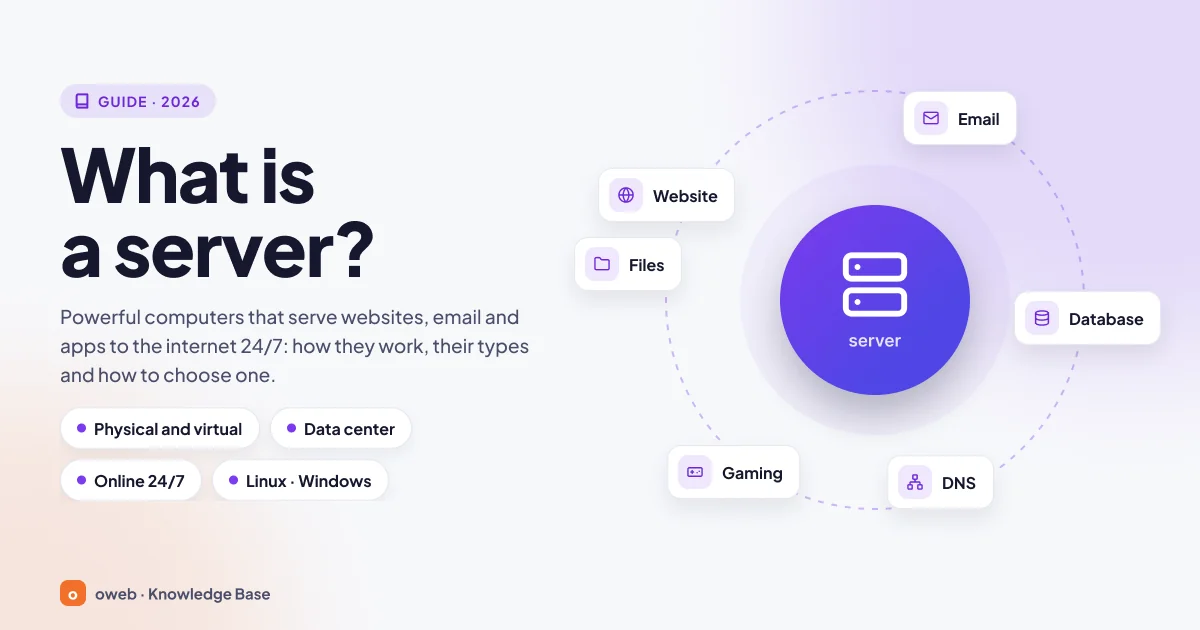
What is a server?
What makes a machine a server is not its case but the role it plays. The client initiates a request; the server stays on and waits, processes the incoming request and sends back the result. The request might be for a web page, an email, a database query or a move in a game. The same machine can be a server for one task and a client for another: when a web server asks a database for data, it is acting as that database's client.
The word "server" comes from the verb "to serve". You can think of a server as a waiter in a restaurant, who in English is also called a server: the customer (the client) places an order, and the waiter (the server) takes it and brings the food. The only difference is that a server can wait on thousands of tables at once.
Is a server a computer or software?
Both. MDN's definition of a web server draws this distinction clearly: on the hardware side, a web server is a computer connected to the internet that stores a website's files; on the software side, it includes at least an HTTP server.
A single machine can take on several roles at once. On a small company's server, the Nginx web server, the MariaDB database server and the Postfix mail server can run side by side. So when people say "database server", they often mean the job of the software running on the machine rather than the machine itself.
How does a server work? The client-server model
Devices connected to the internet fall roughly into two groups: clients, which send requests (your computer, your phone and the browser or app running on it), and servers, which respond to those requests. When you open a page, the page's code travels from the server to the client, and the browser interprets that code and renders it on screen.
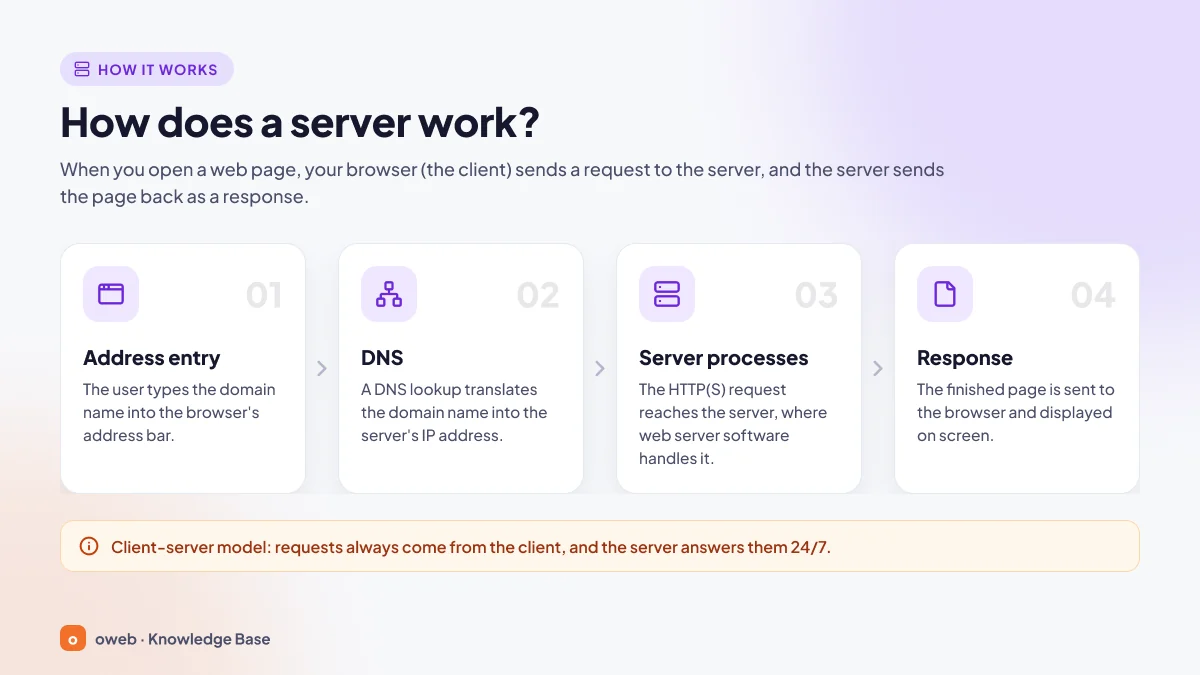
When you open a website, these four steps happen behind the scenes:
- You type the address: You enter a domain name such as
www.yourdomain.cominto the browser. The browser first needs to find out which server hosts the site. - DNS translates the domain name into an IP address: The browser and the operating system first check their own caches; if there is no record, a query is sent to a DNS resolver, which returns the IP address (e.g.
203.0.113.10). Only then can the HTTP request be sent. - The server processes the request: The browser connects to that address; first a TCP connection is established, followed by a TLS handshake if the site uses HTTPS (HTTP/3 replaces these with QUIC, which runs over UDP), and then the HTTP request is sent. The web server software sends static files (images, CSS) as they are. On dynamic sites, an application layer such as PHP, Node.js or Python runs and pulls data from the database if needed.
- The response returns to the browser: The server sends a status code (
200 OKif successful) and the page content in packets; the browser reassembles the packets and displays the page.
The "Browser request" step in the diagram refers to the user entering the address; the actual HTTP(S) request is sent after DNS returns the IP address. For a detailed walkthrough of the flow, see MDN's "How the web works" page.
A quick test from the command line
You can watch DNS resolution and a server's response on your own computer. The first command below shows the domain's IP address and the second shows the server's response headers. The example uses example.com, a domain reserved for documentation; replace it with your own domain (the output shown is illustrative):
$ dig +short www.example.com
203.0.113.10

$ curl -I https://www.example.com
HTTP/2 200
content-type: text/html; charset=UTF-8
server: nginx
On Windows, use nslookup www.example.com instead of dig, and in PowerShell use curl.exe -I https://www.example.com instead of curl. If dig is not installed on Linux, install the bind9-dnsutils package on Debian/Ubuntu or bind-utils on AlmaLinux/Rocky Linux.
What do HTTP status codes mean?
- 200: The request succeeded and the content was sent.
- 301: The resource has moved permanently to another address.
- 403: Access is denied.
- 404: The requested resource was not found.
- 503: The request cannot be handled right now because of a server-side problem (overload, maintenance).
What is a port, and which service uses which port?
A server with a single IP address can provide web, email and SSH services at the same time. The port number determines which service the traffic goes to: if the IP address is the building's street address, the port is the apartment number.
| Port | Protocol | What is it used for? |
|---|---|---|
| 80 / 443 | HTTP / HTTPS | Web traffic (443 is encrypted with TLS) |
| 22 | SSH / SFTP | Secure remote access and file transfer |
| 21 | FTP | Classic file transfer (plain FTP is unencrypted; FTPS with explicit TLS also uses this port) |
| 53 | DNS (UDP and TCP) | Domain name queries |
| 25 | SMTP | Mail transfer between email servers |
| 587 / 465 | SMTP submission | Sending mail from an email client |
| 993 / 995 | IMAPS / POP3S | Reading or downloading incoming mail over an encrypted connection |
What is a server used for?
A server's core job is to deliver a service from a single central point to many users without interruption. The main use cases are:
- Websites and applications: Corporate sites, blogs, online stores, SaaS products.
- Business email: Addresses tied to your domain, such as
[email protected]. - Databases and APIs: Customer, order and inventory records; the back end of mobile apps.
- File sharing and backup: Shared folders, archives, backup copies.
- Game servers: The shared game world in multiplayer games.
- Business software: ERP, CRM, accounting and remote desktop solutions.
For example, when you place an order in an online store, the web server receives the request, the application code creates the order, the database stores the record and the mail server sends the confirmation email.
What are the types of servers?
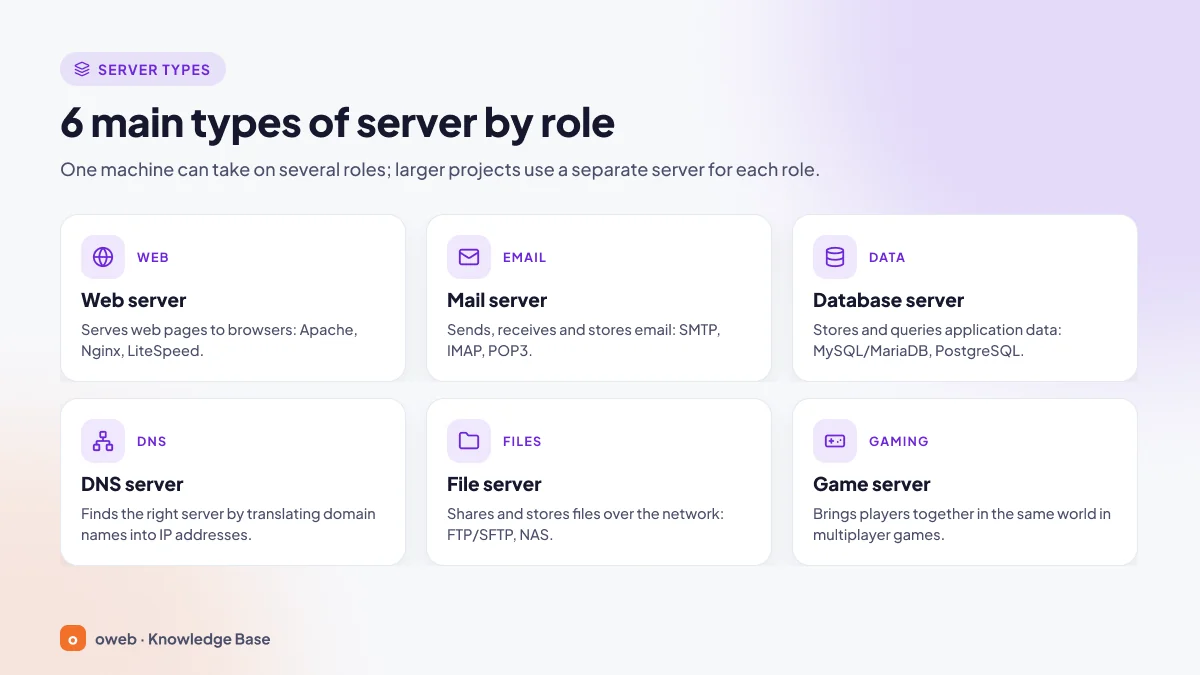
Servers are usually named after the job they do. These are the six types you will come across most often:
What is a web server?
A web server is software that handles HTTP and HTTPS requests and sends pages, images and other files to the browser. Common options you can install on your own server include:
- Apache HTTP Server: Very common in shared hosting thanks to its modular design and
.htaccesssupport. - Nginx: Its event-driven architecture handles large numbers of concurrent connections with little memory; it is also widely used as a reverse proxy.
- LiteSpeed: Compatible with Apache's mod_rewrite rules. Alongside the commercial Enterprise edition, there is also OpenLiteSpeed, licensed under GPLv3.
- Microsoft IIS and Caddy: IIS is preferred in Windows Server environments; Caddy stands out for its automatic HTTPS and simple configuration.
According to W3Techs data dated October 24, 2026, among websites whose web server can be identified, Nginx has a 30.2% share, Apache 21.3% and LiteSpeed 13.9%. Cloudflare, at the top of the list (32.7%), is a CDN and reverse proxy layer that sits in front of websites; it is not software you install on your server.
Don't confuse the web server with the application layer: Nginx or Apache receives the request, while PHP code is usually executed by PHP-FPM and JavaScript code by a separate runtime such as Node.js. In Apache, PHP can also run inside the web server process via mod_php; LiteSpeed uses LSAPI for PHP.
What is an email server?
An email server sends mail, relays it between servers and stores it in mailboxes:
- SMTP sends mail and relays it from server to server (port 25 between servers; port 587 or 465 for submission from an email client).
- IMAP keeps mail on the server, so the same mailbox can be read in sync across multiple devices. The current version is IMAP4rev2 (RFC 9051).
- POP3 usually downloads mail to a single device.
The MX record in DNS determines which server incoming mail is delivered to. Postfix and Exim are common SMTP servers, and Dovecot is a common IMAP/POP3 server. To keep mail out of spam folders, SPF, DKIM and DMARC records must be configured correctly.
What is a database server?
A database server is a system that stores data in an organized way and answers queries from applications. The most common relational databases on the web are MySQL, its community fork MariaDB, and PostgreSQL. As of October 2026, MySQL 8.0 has reached end of support; the supported long-term support (LTS) lines are 8.4 and 9.7, released in April 2026. The latest major version of PostgreSQL is 18; PostgreSQL 19, currently at the release candidate (RC) stage, is scheduled for release in November 2026.
Busy systems use primary/replica replication. Replication improves availability and read capacity, but because an accidentally deleted table is also replicated to the replicas, it is not a substitute for backups.
What is a DNS server?
DNS is a distributed, hierarchical system that maps domain names to IP addresses; its core definition is in RFC 1034 and RFC 1035. Authoritative DNS servers hold a domain's records, such as A, MX and TXT. Resolvers look up these records on the user's behalf and cache them; your internet service provider's DNS servers, as well as Google (8.8.8.8), Cloudflare (1.1.1.1) and Quad9 (9.9.9.9), fall into this group. DNS uses port 53 over both UDP and TCP.
What is a file server?
A file server stores files in a central location and makes them available to users on the network. In office networks, SMB (built into Windows, and available on Linux through Samba) is used for folder sharing, and NFS in Unix/Linux environments. For transfers over the internet, FTP and SFTP are the main options; because FTP carries passwords and data unencrypted (in plain text), SFTP, which runs over SSH, or FTPS, which uses TLS, should be preferred. NAS is not a protocol but a type of device designed to act as a file server.
What is a game server?
In multiplayer games, a game server processes players' actions in real time and shows everyone the same game world. Latency (ping) is the deciding factor here: hosting the server close to the players (for example, in Turkey for players in Turkey) directly improves the experience. Since game servers are frequent targets of DDoS attacks, a DDoS-protected network is important.
Other server roles
Other common roles include application servers (Node.js, Apache Tomcat), reverse proxies and load balancers (Nginx, HAProxy) and monitoring servers (Zabbix, Prometheus). A classic proxy server (e.g. Squid) goes out to the internet on the client's behalf and handles filtering, caching or hiding the client's IP address; a reverse proxy, by contrast, sits in front of the server and distributes incoming requests to back-end servers.
Server service types: VPS, VDS, dedicated, cloud and colocation
When renting a server, how the server is delivered to you matters as much as what it does. A site can run on a small slice of a physical machine or on a machine reserved entirely for you. The model you choose determines the resources allocated to you, your level of administrative control and the cost. Server colocation, where you place your own hardware in a data center, is a separate option distinct from renting.
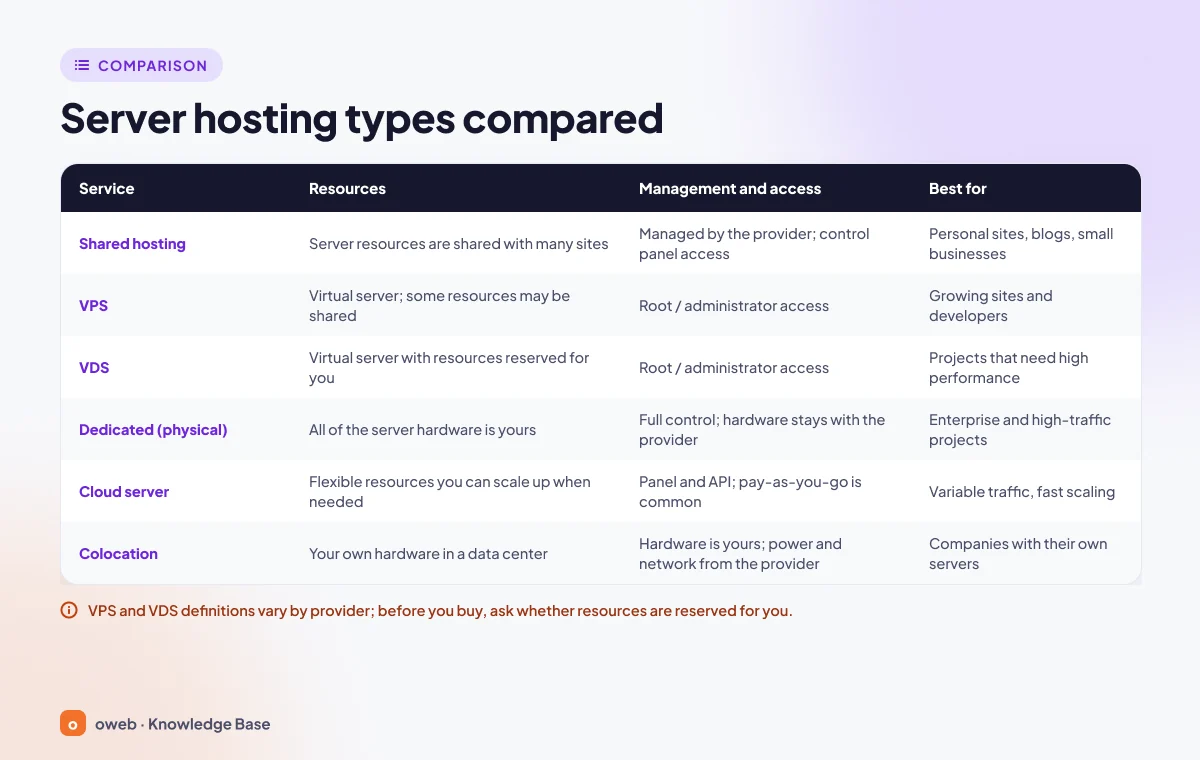
| Service | Resources | Management and access | Who is it for? |
|---|---|---|---|
| Shared hosting | CPU, RAM and disk are shared with other sites | No root access; managed through a panel such as cPanel or Plesk, server maintenance handled by the provider | Small sites, blogs, company websites |
| VPS | Virtual machine partitioned by a hypervisor (KVM, etc.); guaranteed RAM and disk, CPU usually shared vCPU | Root/administrator access, choice of operating system | Growing sites, e-commerce, developers |
| VDS | Virtual server, but with dedicated (unshared) CPU cores and resources* | Root/administrator access | Projects that need stable, high performance |
| Dedicated (physical) server | All hardware reserved for a single customer (single tenant) | Full root access; remote access usually via IPMI, iDRAC or iLO | High traffic, heavy databases, regulatory compliance requirements |
| Cloud server | On demand from a resource pool; fast scaling, pay as you go | Self-service management via a panel or API | Variable workloads, fast-growing projects |
| Server colocation | Hardware owned by the customer; the data center provides space (U/rack), power, cooling and network connectivity | Hardware maintenance and management by the customer (paid on-site support may be available) | Organizations that want to use their own hardware |
*VDS is not a standard term; its definition varies by provider.
What is shared hosting?
With shared hosting, a single server hosts many sites and the resources are shared. Server setup, security and updates are the provider's responsibility; you manage your site, email and databases from a control panel. It is the most economical option, but you can be affected by another site on the same server consuming excessive resources (the "noisy neighbor" effect), and without root access you cannot install custom software.
Root is the administrator account on Linux with full privileges. Root access means you can install any software you want on the server and change every setting; the Windows equivalent is the Administrator account.
What is a VPS?
A VPS (Virtual Private Server) is a virtual machine created by partitioning a powerful physical server, usually with a virtualization layer called a hypervisor. Each VPS has its own operating system and receives an allocated share of memory, processor and disk. With root access, you can install any software you need. In this respect, a VPS sits between shared hosting and a dedicated server.
With hardware virtualization such as KVM or VMware ESXi, each virtual machine runs its own kernel. Container-based solutions such as OpenVZ or LXC share the host machine's kernel; this approach is more efficient but offers weaker isolation. You can review sample resource options in Oweb's Linux VPS plans.
What is a VDS, and how does it differ from a VPS?
A VDS (Virtual Dedicated Server) is also a virtualized server, not a physical one. In international sources it is mostly used as a synonym for VPS. Providers in Turkey, however, generally use VDS to mean a virtual server whose processor cores are not shared with other customers and which is not oversold (no overcommit). Because the term is not standardized, look past the label to the provider's CPU allocation policy: are the cores reserved for you alone, or are they shared? Before ordering, ask the support team in writing about the core allocation model.
What is a dedicated server?
A dedicated server (also known as a physical server or bare metal) is a service model in which a machine in the data center is reserved entirely for a single customer. The processor, memory and disks are not shared with any other tenant, and there is no provider hypervisor in between. If you wish, you can install a platform such as Proxmox VE on the machine and split it into your own virtual servers. It offers the most predictable performance for high-traffic sites, large databases and projects that require hardware-level isolation; on the other hand, provisioning usually takes longer than for virtual servers.
What is a cloud server?
A cloud server is a virtual server created on demand from a large pool of resources. NIST SP 800-145 defines the five essential characteristics of cloud computing as on-demand self-service, broad network access, resource pooling, rapid elasticity and measured service; in this model, a cloud server is an IaaS (Infrastructure as a Service) product. You can scale resources up or down quickly; however, cloud does not mean uninterrupted service, and if usage is not monitored, the cost can exceed that of a fixed-price server.
What is server colocation?
With server colocation, you own the hardware. You bring your server to the data center, and the data center provides space in a rack, uninterruptible power (UPS and generators), cooling, network connectivity and physical security. Racks are built to the 19-inch standard and are typically 42U or taller (1U = 44.45 mm); half or quarter racks can also be rented. Hardware maintenance is your responsibility; for tasks such as replacing a disk, you can use the data center's on-site support (remote hands) service.
Server hardware: how is it different from a regular computer?
Technically, any computer can run server software. Three features set server hardware apart: it is designed to run 24/7 for years, it has redundant components, and it can be managed remotely.
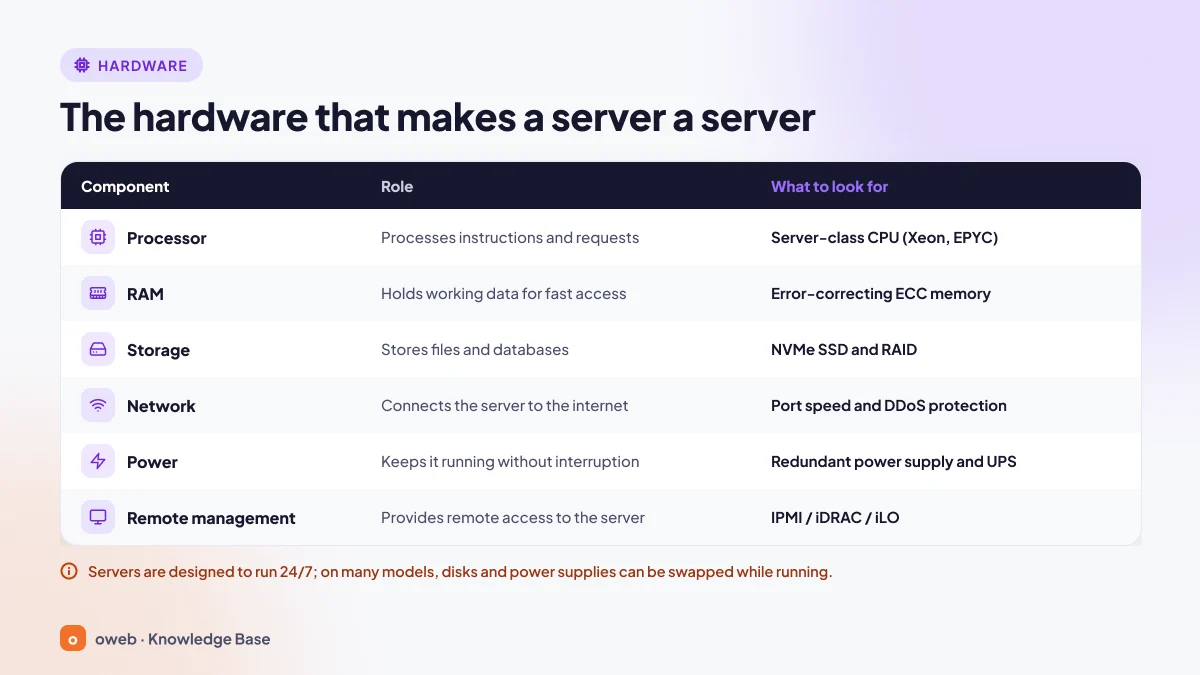
Processor (CPU)
Servers mostly use Intel Xeon and AMD EPYC processors; ARM-based processors such as Ampere are also an option. A server that handles many requests at once benefits from a high core count, while heavy single-threaded workloads benefit from a high clock speed. As of October 2026, the most common current generations are Xeon 6 and Xeon 6+ (shipping since June 2026) on the Intel side and the EPYC 9005 series on the AMD side. AMD's new Zen 6-based EPYC generation was unveiled in July 2026 but is not yet widely available in rental servers.
Memory (RAM)
Enterprise servers use ECC (Error-Correcting Code) memory. ECC automatically corrects single-bit memory errors and detects many errors that affect multiple bits, reducing the risk of crashes and silent data corruption. It requires support from both the processor and the motherboard. Current servers typically use registered ECC (RDIMM) DDR5 modules; the "on-die ECC" in DDR5 is not a substitute for full ECC.
Storage: NVMe SSD and RAID
NVMe is a protocol designed for SSDs to communicate directly over the PCI Express bus. Compared with SATA and SAS, it offers lower latency and much higher parallelism; the difference is especially noticeable on database-heavy sites. To protect against disk failure, disks are combined with RAID: RAID 1 writes data to two disks simultaneously, while RAID 10 combines mirroring and striping to provide both reliability and performance.
RAID is not a backup method. An accidentally deleted file, data encrypted by ransomware or a broken update is reflected on every disk in the array at the same time. Follow the 3-2-1 rule: at least 3 copies, on 2 different storage media, with 1 copy kept off the server in a different location.
Network, power and the data center
The network port speed (e.g. 1 or 10 Gbit/s) determines how much traffic the server can carry; when choosing a plan, also check the traffic quota, the number of IP addresses and DDoS protection. DDoS protection is not part of the server; it is a service the provider offers at the network layer.
Enterprise servers usually have two power supplies (redundant PSUs); if one fails, the other takes over the load. UPS units and generators ensure power continuity at the data center level. In the Tier I-IV classification that the Uptime Institute uses for data centers, Tier III means maintenance can be carried out without interrupting service, while Tier IV refers to fault-tolerant, mutually independent systems.
Remote management: IPMI, iDRAC and iLO
Server motherboards include a management controller (BMC) that runs independently of the operating system. This means you can access the screen remotely, restart the server or reinstall the system even if the operating system will not boot. Dell calls this interface iDRAC and HPE calls it iLO. IPMI is a vendor-neutral standard that is still widely used; on new servers, Redfish, based on HTTPS and JSON, is gaining ground as IPMI's modern successor. The graphical remote console requires an additional license on some models. Do not leave the BMC interface exposed to the internet; access it over a VPN or a separate management network.
Form factors: rack, tower and blade
- Rack server: Mounted in 19-inch standard racks in data centers; its height is expressed in units such as 1U and 2U.
- Tower server: Resembles a desktop case; used in small offices that have no rack.
- Blade server: A thin server board that slots into a shared chassis; it shares power and cooling with the other blades to achieve high density.
Server operating systems: Linux or Windows Server?
The operating system largely determines which software can run on the server. Open-source Linux distributions are common on the web side; Windows Server is preferred for projects tied to Microsoft technologies.
Linux server distributions
- Ubuntu Server: Ubuntu 26.04 LTS was released in April 2026; it receives standard support until April 2031, and Ubuntu Pro extends support to 10 years.
- Debian: Known for its stability. The current stable release is Debian 13 "trixie"; the previous release, Debian 12 (bookworm), entered its LTS period in July 2026 and will receive security updates until June 30, 2028.
- AlmaLinux and Rocky Linux: Free, RHEL-compatible distributions; their 10.x releases are available. The RHEL 10 family requires a processor that supports x86-64-v3; AlmaLinux also offers an x86-64-v2 build for older hardware.
Support for CentOS Linux 7 ended on June 30, 2024, and for CentOS Linux 8 on December 31, 2021; systems still running these versions should be migrated to AlmaLinux or Rocky Linux without delay.
Windows Server
Windows Server is preferred for ASP.NET applications built on the .NET Framework, Active Directory, remote desktop services and enterprise software that runs only on Windows (current .NET versions and SQL Server can also run on Linux). The current version is Windows Server 2025; according to Microsoft's lifecycle page, mainstream support ends on November 13, 2029 and extended support on November 14, 2034. Extended support for Windows Server 2016 ends on January 12, 2027; anyone still using this version should start planning an upgrade now.
| Criterion | Linux | Windows Server |
|---|---|---|
| License | Most distributions are free; enterprise editions such as RHEL require a subscription | Paid license; on rented servers usually added to the monthly fee |
| Common software | Apache, Nginx, LiteSpeed, PHP, Node.js, MySQL/MariaDB, PostgreSQL | IIS, ASP.NET, SQL Server, Active Directory |
| Management | SSH and the command line; cPanel or Plesk | Remote Desktop (RDP), PowerShell; Plesk |
The versions and support dates in this guide are valid as of October 2026. Before you start an installation, check the official lifecycle page for the version you choose.
How is a server managed?
Servers are managed in two ways: with a control panel or from the command line over SSH. On Windows Server, Remote Desktop (RDP) and PowerShell are added to these.
Managing with a control panel
Control panels reduce everyday tasks such as domains, email accounts, databases, SSL/TLS certificates and backups to a few clicks. cPanel is the most common panel in Linux hosting (its server administration interface is WHM); Plesk stands out because it runs on both Linux and Windows servers. For details, see our What is cPanel and What is Plesk guides.
Managing from the command line with SSH
On VPS, VDS and dedicated servers, the main management tool is an SSH connection. SSH gives you access to the server's command line over an encrypted connection and uses port 22 by default.
What to check on first login
When you connect to a newly delivered Linux server, you can get to know it in a few minutes with these commands:
ssh [email protected]        # connect to the server
cat /etc/os-release          # distribution and version
uptime                       # uptime and load average
nproc                        # number of available logical processors (vCPUs)
free -h                      # memory usage
df -h                        # disk usage
The "load average" values in the uptime output show the average load over the last 1, 5 and 15 minutes. If the values stay above the processor count reported by nproc for a long time, the CPU may be insufficient or there may be a disk I/O bottleneck.
Key-based login and disabling root login
The first security step is to log in with an SSH key instead of a password and to disable direct root login. First create a key pair on your own computer and copy the public key to the server:
ssh-keygen -t ed25519
ssh-copy-id [email protected]
ssh-copy-id is not available on Windows; manually add the contents of the public key file (the one ending in .pub) to the ~/.ssh/authorized_keys file on the server. Once you have confirmed that you can log in with the key, write the settings to a separate file. Because sshd uses the first value it reads for each setting, a file whose name starts with 00- is read before the other files in the sshd_config.d directory (e.g. 50-cloud-init.conf on cloud images):
# /etc/ssh/sshd_config.d/00-hardening.conf
PermitRootLogin no
PasswordAuthentication no
KbdInteractiveAuthentication no
Then validate the configuration, check the effective values and restart the service:
sudo sshd -t    # prints nothing if there are no errors
sudo sshd -T | grep -Ei '^(permitrootlogin|passwordauthentication|kbdinteractiveauthentication) '    # shows the effective values
sudo systemctl restart ssh    # AlmaLinux/Rocky Linux: sudo systemctl restart sshd
sshd -T prints the server's current (effective) configuration. OpenSSH 10.4 and later print keyword names in mixed case (e.g. PermitRootLogin no), while older versions print them in lowercase (permitrootlogin no). Because the -i option in the grep command makes the match case-insensitive, all three values are listed either way.
If the main /etc/ssh/sshd_config file does not contain the line Include /etc/ssh/sshd_config.d/*.conf (as can happen on older versions), write the settings directly into that file.
Before applying these settings, confirm that you can log in over SSH with a key as your user with sudo privileges. After restarting the SSH service, do not close your current session; test the connection in a separate session.
Managed vs. unmanaged servers
With an unmanaged server, the provider is responsible for the hardware and the network; the operating system, updates, security and backups are your responsibility. With a managed server, setup, updates, security hardening, monitoring and troubleshooting are handled by the provider's technical team. If your team has no system administrator, a managed server service is a practical way to hand off the operational workload.
How do you secure a server?
The principles in the NIST SP 800-123 guide to server security still hold today. The most important practical steps are:
- Remove unused services and expose only the ports you need.
- Apply operating system and software updates regularly.
- Use a firewall: ufw on Ubuntu/Debian, firewalld or nftables directly on AlmaLinux/Rocky Linux. CSF, often seen on older servers, should not be chosen for new installations because its developer ceased operations in August 2025.
- Use key-based SSH login instead of passwords and disable direct root login.
- Block brute-force attempts with a tool such as fail2ban.
- Encrypt web traffic with TLS; Let's Encrypt provides free certificates.
- Give every user and application only the privileges it needs.
- Monitor logs and set up alerts for unusual activity.
- Keep backups off the server and test restores regularly.
What should you look for when choosing a server?
The right server is not the most powerful one, but the one that meets your needs at a reasonable cost and in a sustainable way. Evaluate these six points in order when deciding:
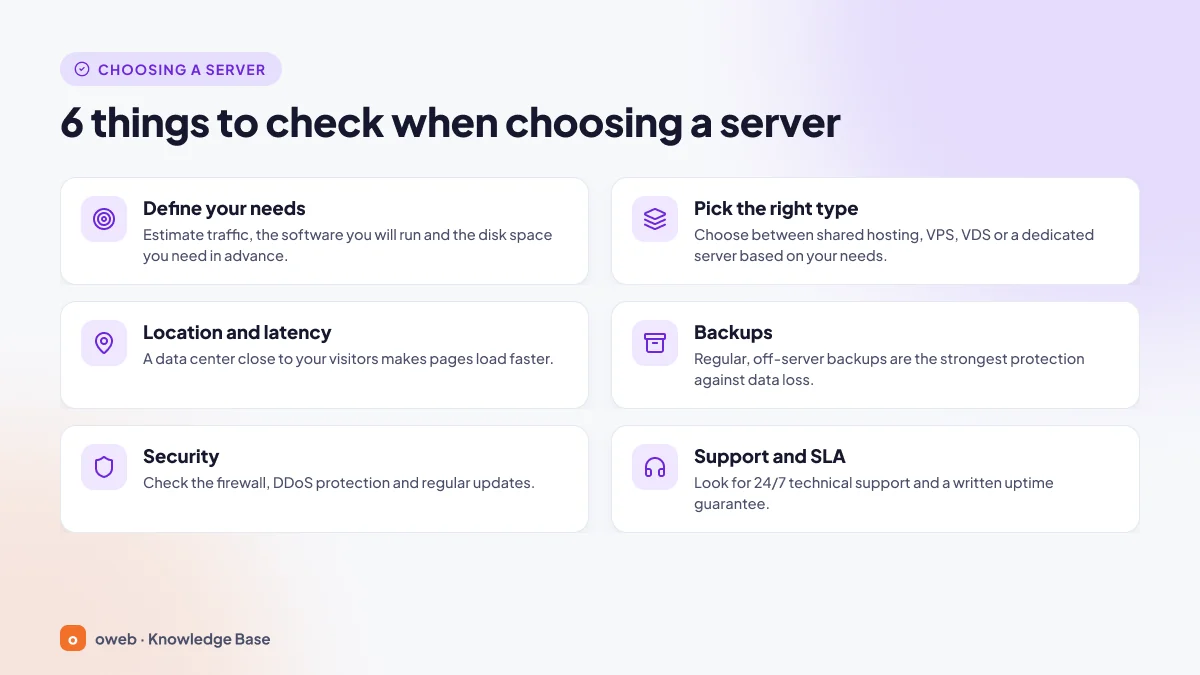
- Define your needs: Note your visitor numbers, the software you will run (WordPress, a custom PHP application, Node.js, a game server), your database and storage size, and your expected growth over the next year.
- Choose the right type: If you don't need root access, shared hosting is enough. Consider a VPS or VDS for custom software or dedicated resources, and a dedicated server for sustained high load.
- Location and latency: If your visitors are in Turkey, a server located in Turkey reduces latency. If you process personal data, take into account the cross-border transfer rules of KVKK (Turkey's Personal Data Protection Law) when choosing a location abroad.
- Backups: Ask how often backups are taken, how many days they are retained, whether they are stored off the server and how they are restored; the 3-2-1 rule is a good benchmark.
- Security: It should be clear who is responsible for the firewall, DDoS protection and updates.
- Support and SLA: Review the support channels, response times and service level agreement (SLA).
What do SLA and uptime mean?
Uptime percentages in an SLA may look close to one another, but the downtime they allow differs considerably. Here is a simple calculation based on 8,760 hours per year:
| SLA (uptime) | Approximate downtime per year | Approximate downtime per month |
|---|---|---|
| 99.9% | 8.76 hours | 43.8 minutes |
| 99.95% | 4.38 hours | 21.9 minutes |
| 99.99% | 52.6 minutes | 4.4 minutes |
In the SLA document, also check whether planned maintenance counts toward this time and what compensation (service credit) applies if the commitment is not met.
KVKK and server location
Article 9 of Turkey's Law No. 6698 on the Protection of Personal Data (KVKK), which governs transfers of personal data abroad, was amended by Law No. 7499, published in the Official Gazette on March 12, 2024; the amendment entered into force on June 1, 2024. Standard contracts and binding corporate rules were listed among the appropriate safeguards, and the standard contract texts were adopted by Board Decision No. 2024/959 (the Authority's announcement, in Turkish). A standard contract must be notified to the Personal Data Protection Authority within 5 business days of the signatures being completed (Law No. 6698, Art. 9/5; the Authority's related announcement, in Turkish). If you plan to run an application that processes customer data on a server abroad, assess these obligations with your legal counsel. Keeping data on a server located in Turkey removes the cross-border transfer question, at least at the hosting layer.
Which server for which need?
| Need | Good starting point | Why? |
|---|---|---|
| Personal blog, company website | Shared hosting | Low cost, maintenance handled by the provider |
| Growing online store, custom PHP or Node.js application | VPS | Root access, dedicated RAM and disk |
| Workloads that use the CPU continuously, mid-sized game server | VDS | Predictable performance if cores are allocated as dedicated (ask the provider) |
| High traffic, large database, regulatory compliance requirements | Dedicated server | All the hardware is reserved for you alone |
| Traffic that fluctuates during campaigns | Cloud server | Resources scale as needed |
| Organizations with their own hardware | Server colocation | You control the hardware; the data center provides the infrastructure |
If you're unsure, start with the smallest option that meets your needs and monitor CPU, memory and disk usage for a few weeks. Upgrading a plan is usually quick on VPS and cloud servers, whereas a large server bought without measuring often means paying for idle capacity.
Can my own computer be a server?
Yes. Any computer with server software installed can act as a server that answers requests. Developers first test sites on their own computers, that is, on localhost. Localhost refers to the computer itself; it corresponds to 127.0.0.1 in IPv4 (in fact the entire 127.0.0.0/8 block) and ::1 in IPv6, and this address can only be reached from within that computer. XAMPP, which installs Apache, PHP and MariaDB in a single package, is popular for this; however, because such packages may listen on all network interfaces by default, keep your firewall enabled. For details, see our What is localhost guide.
Using a home computer as an internet-facing server, however, is not suitable for live projects:
- IP address: Home connections usually have a dynamic IP; on lines that use CGNAT, requests from outside may never arrive at all.
- Upload speed: Traffic to visitors goes in the upload direction, and upload speeds on home connections are usually low.
- Outages: Homes don't have redundant power, generators or a second internet line.
- Security and terms of service: Every port you open puts your home network at risk; some internet service providers may restrict running servers or block port 25.
A home server is a good lab for learning; a service that customers access, however, needs a server in a data center.
Frequently asked questions
What is the difference between a server and hosting?
A server is the computer and software that run a service. Hosting (web hosting) is the provision of a server's resources to you as a service to keep your site online. With shared hosting you share the server with other sites; with a VPS, VDS or dedicated server, part or all of the resources are reserved for you.
Is a VPS a real server?
A VPS is a virtual server running on top of a real physical server. Because it has its own operating system, IP address and root access, it is used like an independent server. However, since it shares hardware with other virtual servers, its performance can be affected by its neighbors' load, especially on plans that use shared vCPUs.
Should I choose a VPS or a VDS?
For websites with fluctuating load, online stores and development environments, a VPS is usually sufficient and more economical. For workloads that keep the CPU constantly busy, such as game servers, compiling or video processing, a VDS with dedicated core allocation delivers more predictable performance. Before deciding, ask the provider about its CPU allocation policy in writing.
What is the difference between a cloud server and a VPS?
Both are virtual machines. A classic VPS is usually a package with fixed resources and a fixed monthly price that runs on a single physical server. A cloud server is created from a large pool of resources; it can be scaled quickly, is often billed by usage and can be moved to another physical machine if the hardware fails. Because pricing models and SLAs vary from provider to provider, look at the details in the contract rather than the label.
What determines server rental prices?
The main factors that determine the price are the number and generation of processor cores, the amount of memory, the disk type and capacity, port speed and traffic quota, the number of IP addresses, operating system and panel licenses, backups, DDoS protection and management services.
Does "serverless" mean there is no server?
No. In a serverless architecture, the code still runs on a server; the difference is that provisioning, scaling and maintaining the servers is the cloud provider's job, and you never see the server. Docker containers, Kubernetes clusters and CDNs also ultimately run on physical servers.