


A 403 Forbidden error means the server understood your request but refuses to grant access to the page or file you asked for. If you own the site, the cause is usually incorrect file permissions, an .htaccess rule, a folder without an index file, an IP block or a firewall rule (ModSecurity, Cloudflare or a security plugin). The fix is to find which layer is blocking the request and correct only that rule.
Key Takeaways
- 403 Forbidden (RFC 9110, section 15.5.4): The server understood the request but refuses to fulfill it.
- How it differs from 401: with a 401, valid authentication credentials are missing. With a 403, logging in again usually does not change the result.
- How it differs from 404: with a 404, the resource cannot be found. A server may also return a 404 instead of a 403 to hide that a resource exists.
- Most common causes on a hosting account: file or folder permissions and ownership, an .htaccess access rule, a folder without an index file, an IP block, ModSecurity/WAF or a security plugin, a Cloudflare rule, a country block and hotlink protection.
- Recommended permissions for WordPress: files 644, folders 755, wp-config.php 440 or 400. No folder should ever be set to 777.
- If you see a Cloudflare page with "Error 1020" or a Ray ID, the block is at Cloudflare. If you see a plain Apache, nginx or LiteSpeed page, the block is on the site's own server.
- Take a backup before making changes and check the error log. Do not turn off the firewall entirely; ask for an exclusion only for the rule that matched by mistake.
What is a 403 Forbidden error?
403 is one of the HTTP status codes a web server sends back to the browser. RFC 9110, which defines the current semantics of HTTP, describes this code as "the server understood the request but refuses to fulfill it". In other words, the connection was made, the request reached the right server and the server understood what was asked. It still refuses to deliver the content because of a rule or a permission setting.
So the short answer to what is a 403 Forbidden error is "a deliberate refusal". Nothing has failed on the server (it is not a 5xx error) and the page has not disappeared (it is not a 404). Default error pages usually do not say why, and the real cause is most often recorded in the server's error log.
According to RFC 9110, if credentials were sent with the request, the server considered them insufficient, and the client should not automatically repeat the request with the same credentials. MDN also stresses that you should expect the same error if the request is repeated unchanged. Some interfaces show this as "Access Denied". Rather than refreshing the page over and over, you need to find the source of the block.
What is the difference between 401, 403 and 404?
These three codes are often confused, but each one needs a different fix.
| Code | Meaning | Typical cause |
|---|---|---|
| 401 Unauthorized | No valid authentication. The server must send a WWW-Authenticate header containing at least one authentication challenge. | Not logged in, a password-protected directory, or a wrong username or password. |
| 403 Forbidden | The server understood the request but refuses to fulfill it. Logging in again usually does not help. | File/folder permissions, an .htaccess Require or deny rule, an IP block, WAF/ModSecurity. |
| 404 Not Found | The resource was not found, or the server does not want to disclose that it exists. It does not say whether the condition is temporary or permanent. | A wrong URL, a deleted or moved page, or a file uploaded to the wrong folder. |
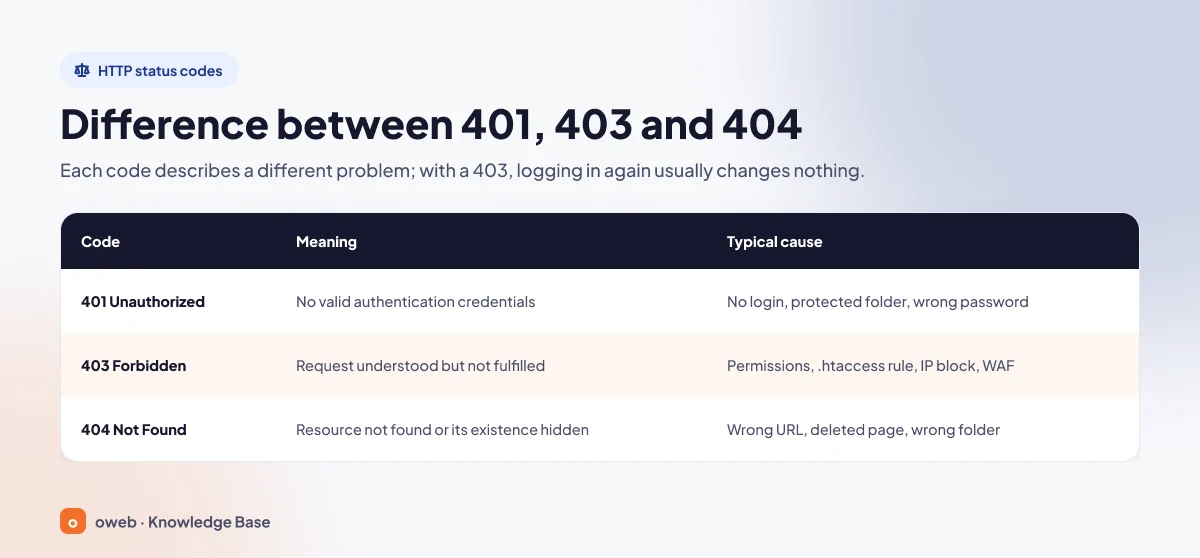
The WordPress REST API shows this distinction well: rest_authorization_required_code() returns 401 to a user who is not logged in and 403 to a user who is logged in but lacks permission. In short, 401 means "I don't know who you are", while 403 means "I know who you are, but you don't have permission".
What does a 403 error look like?
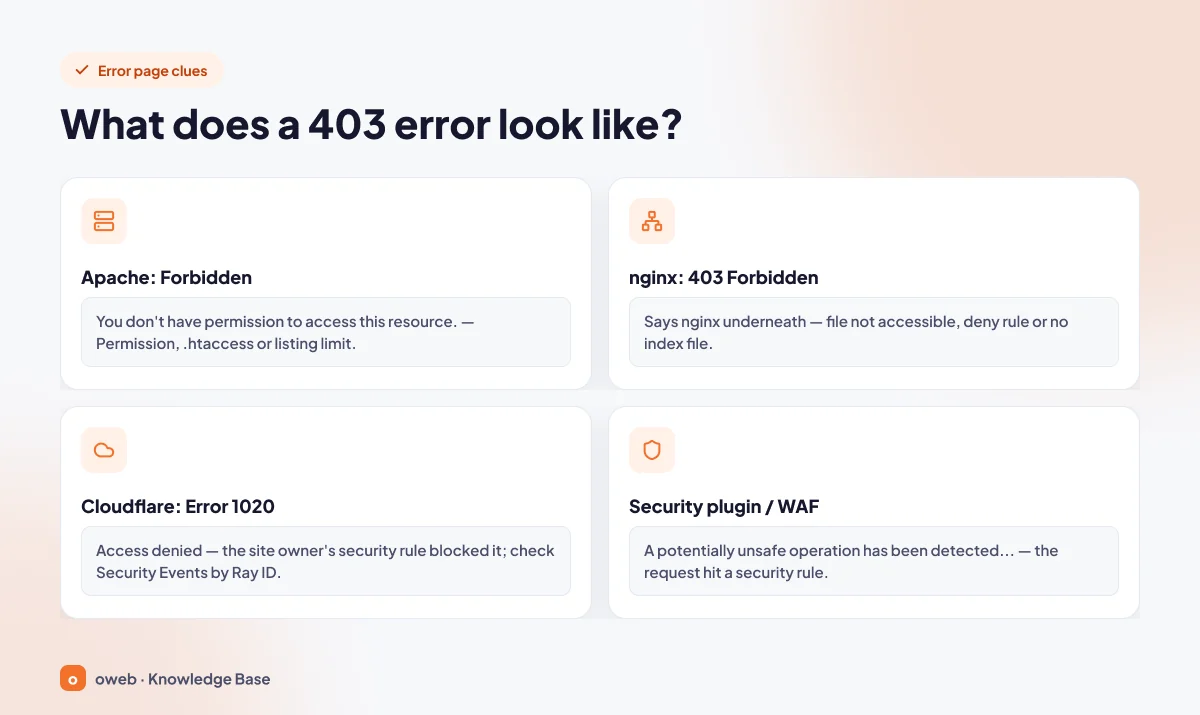
What the error page looks like is the quickest clue to which layer blocked the request. Sites with a custom error page may show a different design.
Apache and LiteSpeed pages
On Apache's default page, the tab title reads "403 Forbidden", the main heading reads "Forbidden" and the text below it says "You don't have permission to access this resource." This text means Apache rejected the request because of a file permission, an .htaccess rule or a directory listing restriction. On LiteSpeed you will usually see the text "Access to this resource on the server is denied!". This wording does not appear in LiteSpeed's official documentation and may vary by version or configuration.
nginx: "403 Forbidden"
The default nginx page shows a centered "403 Forbidden" heading with the word "nginx" below it, separated by a line. This page can mean that nginx cannot access the file, that a deny rule rejected the request, or that listing is disabled for a folder without an index file. nginx also does not read .htaccess files; its rules live in the server configuration.
Cloudflare: Error 1020 and other 1xxx codes
"Error 1020 Access denied" means a Cloudflare security feature set up by the site owner blocked the request, and it returns HTTP 403. Errors 1006/1007/1008 (IP block), 1009 ("Country or region banned") and 1010 (browser signature) also return 403. Visitors blocked by WAF custom rules or managed rules see a "WAF block" page instead of 1020. That page also returns a 403 status code and usually includes a Ray ID (Cloudflare 1xxx errors).
Security plugin or WAF block
When Wordfence stops a suspicious request, it usually displays the message "A potentially unsafe operation has been detected in your request to this site". ModSecurity shows the visitor a plain 403 page, but it writes an "Access denied with code 403" line containing the rule ID to the error log.
| What you see on screen | Blocking layer | Where to look first |
|---|---|---|
| "Forbidden" and "You don't have permission..." | Apache (or an Apache-compatible server) | Permissions, .htaccess, cPanel > Metrics > Errors |
| "403 Forbidden" in the center, "nginx" below | nginx | nginx error log, index and deny settings |
| "Access to this resource on the server is denied!" | LiteSpeed | Permissions, .htaccess, server security modules |
| Error 1020, 1009 or a block page with a Ray ID | Cloudflare | Cloudflare Security Events |
| A page containing a plugin name or the phrase "unsafe operation" | WordPress security plugin | The plugin's live traffic view and block list |
How to find the source of the block in two minutes
If you have command-line access, checking the response headers is faster:
curl -I https://example.com/sorunlu-sayfa/The first line shows the status code (e.g. HTTP/2 403). curl -I sends a HEAD request. Some firewalls and applications respond to a HEAD request differently than to a normal page request (GET), so run the same check with GET too:
curl -sS -o /dev/null -D - https://example.com/sorunlu-sayfa/If the headers include cf-ray, the request passed through Cloudflare, but that does not mean the block is at Cloudflare. On sites behind Cloudflare, the server header shows cloudflare. The content of the error page tells you where the block comes from: a Cloudflare page with Error 1020 or a Ray ID, or an Apache or LiteSpeed page.
Also keep this in mind: an error that appears only on your network usually points to an IP or country block. An error that appears everywhere points to a permission or configuration problem.
What causes a 403 Forbidden error?
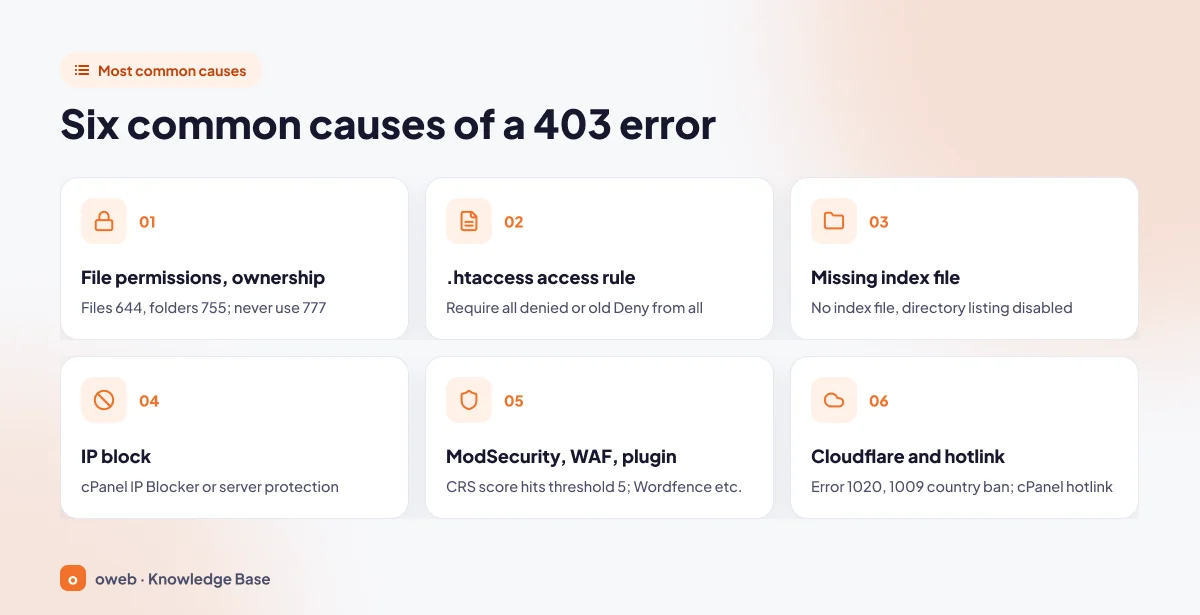
Most 403 errors on shared hosting fall into one of the six categories below. LiteSpeed's 403 guide for cPanel gives a similar list.
1. Incorrect file and folder permissions or ownership
On Linux servers, every file has an owner, a group and a three-digit permission value. With 644, the owner can read and write, while the group and other users can only read. On folders, 755 gives the owner full rights and lets the group and other users read the folder and enter it (execute). If the web server cannot read a file or cannot enter a folder along the path, it rejects the request with a 403.
WordPress's hardening guide also uses 644 for files and 755 for folders as the baseline file permissions. Ownership matters too. If a file was uploaded as a different user (e.g. as root), servers that enforce strict ownership checks may refuse to serve it.
2. Access rules in the .htaccess file
In Apache 2.4, access is controlled with Require directives. Require all denied denies access unconditionally, so if this line applies to a folder or appears in a file block, the visitor gets a 403. The old Apache 2.2-style Order, Allow and Deny directives are deprecated according to the Apache documentation, and mixing the two styles in one file can produce unexpected results. When troubleshooting a .htaccess 403 error, also check rewrite rules with the F flag and Options lines written without a prefix. Options written without + or - replaces all inherited options and turns off any that are not listed.
3. A folder without an index file and disabled directory listing
When a folder URL is requested, the server first looks for an index file. In Apache this is set by the DirectoryIndex directive and in nginx by the index directive, and both default to index.html. If there is no such file and directory listing is disabled (Options -Indexes in Apache, the default autoindex off; in nginx, "No Indexing" in the cPanel Indexes tool), the server returns a 403. Keeping listing disabled is the right choice for security; the fix is to add a suitable index file.
If the files were uploaded to a subfolder (e.g. public_html/site/) instead of the document root, the main folder has no index file either. With listing disabled, the result is again a 403.
4. IP block
cPanel's IP Blocker tool converts the IP addresses or ranges you enter into CIDR format and adds them to the .htaccess file. If you accidentally added your office or home IP address, you and everyone else using that IP address cannot see the site, while other visitors see it normally.
Server-level protection tools may also block an IP after many failed attempts. This block sometimes appears as a 403 page, but more often as a connection timeout. These blocks usually do not show up in the user panel, so your hosting support needs to check them.
5. ModSecurity, WAF and security plugins
ModSecurity is a web application firewall (WAF) that checks requests against a set of rules. The widely used OWASP Core Rule Set (CRS) does not block on a single rule match. Instead, each matching rule raises the request's anomaly score. The recommended threshold for inbound requests is 5, and once the score reaches it, the request is rejected.
A post containing code or a long form submission can trigger a rule even though it is legitimate. This is called a false positive, and it is the first thing to suspect with ModSecurity 403 errors. WordPress plugins such as Wordfence or All in One WP Security can also return a 403 based on IP, country or request pattern.
6. Cloudflare rules, country blocks and hotlink protection
A WAF custom rule, IP Access rule or country block in Cloudflare produces a 403 before the request ever reaches your server. That is why the block does not appear in your server's error log but in Cloudflare's event logs (Security Events). cPanel's Hotlink Protection stops other sites from embedding your images. If you do not add your own subdomains to the allowed list, your own images may be blocked as well.
Check the error log first
Instead of changing files by guesswork, read why the server rejected the request. In cPanel, the Metrics > Errors tool shows the last 300 entries in the web server's error log, from newest to oldest. Look for the line that matches the time you got the error.
| What you see in the error log line | Meaning | Step to go to |
|---|---|---|
AH01630: client denied by server configuration | A Require/deny rule (.htaccess or IP Blocker) rejected the request. | Step 3 / Step 5 |
AH00035: access to ... denied ... because search permissions are missing on a component of the path | A folder along the path is missing the execute (search) permission. | Step 2 |
AH00132: file permissions deny server access | Apache could not read the file because of its permissions. | Step 2 |
AH01276: Cannot serve directory ... No matching DirectoryIndex | Apache found no index file in the folder, and listing is disabled. | Step 4 |
directory index of "..." is forbidden | nginx found no index file in the folder, and autoindex is off. | Step 4 |
open() "..." failed (13: Permission denied) or "..." is forbidden (13: Permission denied) | nginx could not open the file or the index file because of permissions (parent folders also need the execute permission). | Step 2 |
ModSecurity: Access denied with code 403 and [id "..."] | A ModSecurity rule blocked the request; the id is the rule number. | Step 5 |
If the error log shows nothing and the site uses Cloudflare, the block is most likely at Cloudflare. If the error happens only on WordPress pages, suspect a security plugin.
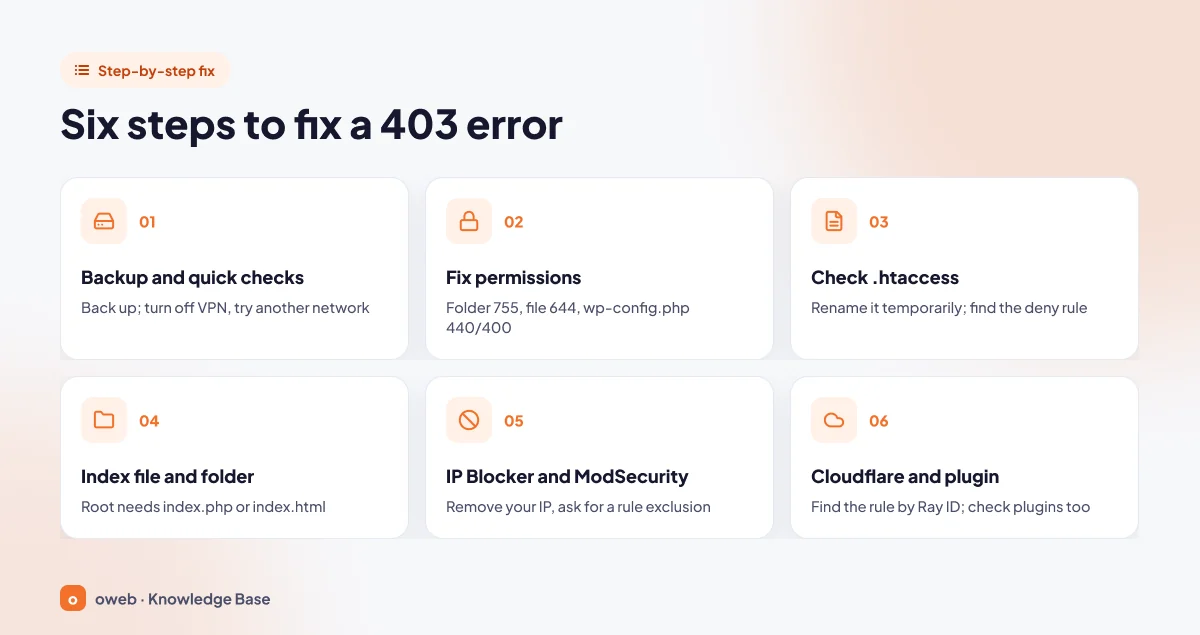
How to fix a 403 error: step by step
The steps go from the simplest and safest to the most advanced. If the error log points to a specific step, start there.
1. Take a backup, then run quick checks
Back up your site before you change files, permissions or the database. Download the backup to your computer or store it in your account's home directory, outside the public_html folder. Anyone can download a backup left in a web-accessible folder.
Next, refresh the page, open it in a private window, try again with your VPN or proxy turned off and, if you can, open it from a different network such as mobile data. If needed, clear the cache and cookies for that site only; this helps with session-related blocks. Browsers and intermediate caches do not store 403 responses unless they are explicitly told to (RFC 9110, section 15.1), so refreshing the page rarely fixes the problem on its own. These checks do show whether the block applies only to you or to everyone.
2. Fix file permissions
Check the permissions if the error log shows a permission denial or if you recently moved files. The target is folders at 755, files and .htaccess at 644, and wp-config.php at 440 or 400. In suexec environments, 640 for files and 750 for folders are also acceptable.
The 440 or 400 values for wp-config.php are meant for environments where PHP runs as your user (suexec-like setups). If the site shows an error with this permission, PHP probably cannot read the file; switch to the value your provider recommends (e.g. 600 or 640). Permission problems can also cause a 500 error. If that happens, see the 500 Internal Server Error guide.
Using cPanel File Manager
Open the File Manager tool in the Files section of cPanel and select the file or folder. Click Permissions in the toolbar, enter the value in the Change Permissions window and save it with the Change Permissions button in that window. If you are new to the panel, read the What is cPanel and how to use it guide.
Bulk fix over SSH
If there are many files, use SSH. First save a list of the current permissions outside the web folder:
cd ~/public_html
find . -printf '%m %p\n' > ~/izin-listesi-yedek.txt
Then run these commands, which follow the same logic as WordPress's official example, only inside your site's folder:
cd ~/public_html
find . -type d -exec chmod 755 {} \;
find . -type f -exec chmod 644 {} \;
chmod 440 wp-config.php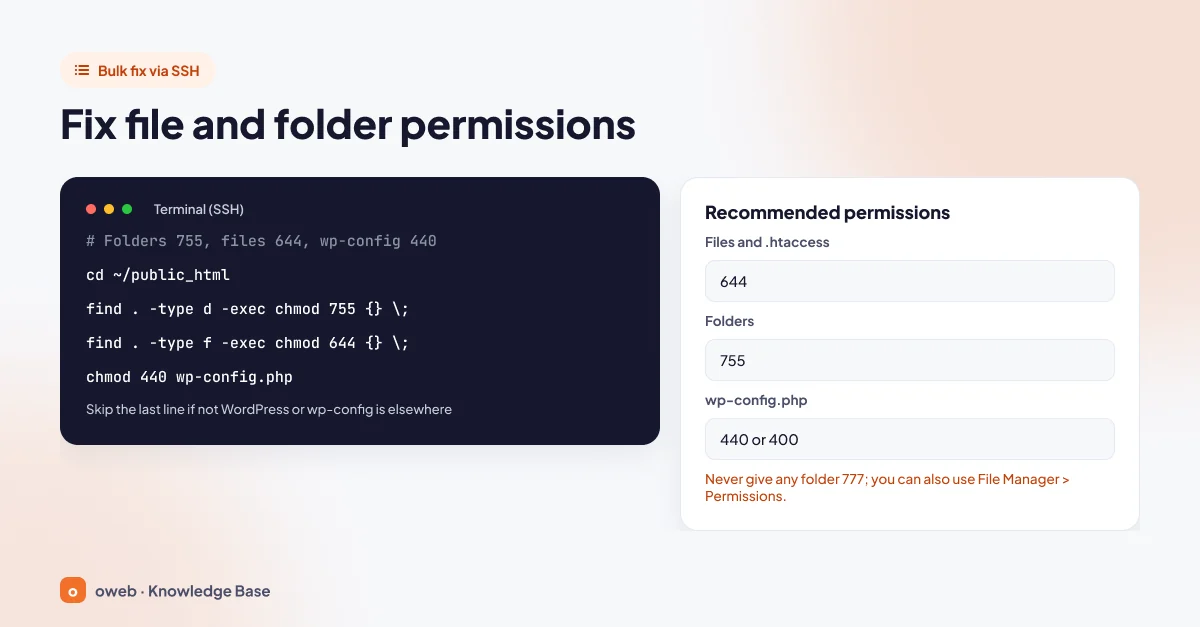
If you do not use WordPress, or your wp-config.php file is not inside public_html, skip the last line, and see the note above about wp-config.php. These commands also set the public_html folder itself to 755. Your hosting provider may use a different permission for this folder (e.g. 750). To keep the folder's own permission, run the first find command with the -mindepth 1 option written before the -type option:
find . -mindepth 1 -type d -exec chmod 755 {} \;Do not change ownership (chown) in bulk. On shared hosting you usually do not have the rights to do this, and wrong ownership can cause new 403 or 500 errors.
On servers running nginx (VPS)
If you manage the server yourself and the web server is nginx, the user nginx runs as must be able to enter every folder on the path to the file (execute permission). Setting the file to 644 is not enough on its own. For PHP sites, the index directive must also include index.php, because the default value is only index.html:
index index.html index.php;Back up the configuration file before you change it. Then use the nginx command-line options to test the configuration first and, if there are no errors, reload it:
sudo nginx -t
sudo nginx -s reload
3. Check the .htaccess file
In File Manager, turn on "Show Hidden Files (dotfiles)" from the Settings menu. Download a copy of the .htaccess file to your computer, then temporarily rename the file (e.g. .htaccess_old) and open the page again.
- If the error goes away, the problem is in this file. Rename it back to its original name, look for
Require all denied,Deny from all,Require not ipor RewriteRule lines with the F flag, and fix only the rule causing the problem. - If the error persists, rename the file back to its original name. The problem is somewhere else.
cPanel's IP Blocker tool writes its blocks to the .htaccess file. If renaming the file clears the error, check the IP Blocker and Hotlink Protection settings before you delete any rules by hand (Step 5).
The correct Apache 2.4 syntax for blocking an IP is shown below. not cannot grant or deny access on its own, so it is used inside RequireAll:
<RequireAll>
    Require all granted
    Require not ip 203.0.113.25
</RequireAll>
If the only problem is that index.php is not recognized as an index file, add this line to the .htaccess file: DirectoryIndex index.html index.php. The server serves the first file from the list that it finds.
Deleting the .htaccess file or regenerating it in WordPress also removes your redirects, HTTPS enforcement, and caching and security rules. Write down the custom rules in the copy you downloaded first. To set up the HTTPS redirect again, you can follow the Redirect HTTP to HTTPS guide. Once the problem is fixed, do not leave backups such as .htaccess_old inside public_html; delete them or move them outside the web root.
4. Check the index file and the correct folder
If the error log contains AH01276 or "directory index of ... is forbidden", either the folder you opened has no index.html or index.php, or the server does not recognize that file as an index. Check that the files are in the domain's document root (usually public_html for the primary domain in cPanel) and not left in a subfolder. If you use an addon domain or subdomain, check its configured document root. Do not turn on directory listing as a workaround; move the files to the right place.
5. Check IP blocks, hotlink protection and the ModSecurity log
cPanel IP Blocker
In cPanel, open the Security > IP Blocker tool. If your own IP, or a range that includes it, is in the list of blocked addresses, click the Delete link in the Actions column and then click the Remove IP button.
cPanel Hotlink Protection
If images or files with certain extensions return a 403, open the Security > Hotlink Protection settings. Check that your own domains and subdomains are in the "URLs to allow access" list. An address that is not on this list cannot access files with the extensions listed in the "Block direct access for the following extensions" field (e.g. .jpg).
cPanel ModSecurity
If you found a "ModSecurity: Access denied with code 403" line in the Metrics > Errors list, the [id "..."] value on the same line is the number of the rule that blocked the request. cPanel's ModSecurity interface offers an On/Off switch for each domain, but cPanel recommends turning ModSecurity off only temporarily while troubleshooting. The right approach is to send the rule number, the time and the URL to your hosting support and ask for a rule exclusion that covers only that rule and that URL.
If you turned off ModSecurity for testing, turn it back on as soon as you have the result. While it is off, no ModSecurity rules apply to that domain and the site has no protection against known attack patterns.
6. Check Cloudflare and security plugin blocks
Cloudflare Security Events
Copy the Ray ID from the error page and search for it, or for the IP address, under Security > Analytics > Events in the Cloudflare dashboard. When matching events to the time of the error, check which time zone the dashboard uses. The event row shows which security feature and rule blocked the request. As of November 2026, Security Events logs are kept for 31 days on all plans, and menu names may differ slightly depending on the dashboard version. Do not lower the overall Security Level; fix only the faulty rule or narrow its scope. That is the safest way to deal with a Cloudflare 403 error.
Country block rules
In Cloudflare, country blocking is done with WAF custom rules. An example expression is (ip.src.country eq "KP") with the Block action. Rules are evaluated in order, and the Block action stops any later rules from being evaluated. Country blocking with IP Access rules is only available on the Enterprise plan. A rule that covers Türkiye (TR) by mistake shows a 403 error to every visitor in Türkiye.
WordPress security plugin
If the block page shows the name of a security plugin or a phrase such as "unsafe operation", the block is inside WordPress. If you use Wordfence, you can find the blocked request on the plugin's Tools > Live Traffic screen and, if the request is safe, add it to the allowlist. If you cannot get into the dashboard, see the WordPress section below.
If the error page shows a Ray ID, check Cloudflare first. If it does not, check the server's error log first. This simple rule keeps you from spending hours searching in the wrong place.
How to confirm the fix worked
Open the page in a private window and from a different network. Then check the status code with a normal GET request. The output should be 200 (or the redirect code you expect):
curl -s -o /dev/null -w "%{http_code}\n" https://example.com/sorunlu-sayfa/Also check that the same line no longer appears in the error log. If a change did not fix the problem, restore the original from your backup.
Things you should never do
- Do not set 777 permissions on any file or folder, including the wp-content/uploads folder.
- Do not permanently turn off ModSecurity, the Cloudflare WAF or your security plugin.
- Do not leave backups such as .htaccess.bak or database dumps inside public_html.
- Do not try to change ownership in bulk on shared hosting.
- Do not turn on directory listing just to make the error go away. Everyone would be able to see what is in your folders.
WordPress 403 error: special cases
A WordPress 403 error usually comes from one of the general causes above, but a few scenarios specific to WordPress need their own explanation.
403 in wp-admin
If you get a 403 when opening the admin dashboard, first check any IP restrictions set for wp-admin and wp-login.php. The example in WordPress's brute force guide allows logins only from the listed IPs, and everyone else gets a 403:
<Files "wp-login.php">
    Require ip 203.0.113.15 203.0.113.16
</Files>
If your internet provider changed your IP, this rule locks you out, so add your new IP. If you have other login problems as well, follow the steps in the Cannot log in to WordPress admin guide. Protecting the whole wp-admin folder with old-style HTTP password protection (Basic Authentication) is no longer recommended, because it can break plugins that use AJAX.
Blocks from security plugins
Wordfence rate-limit blocks usually show up as a 503 rather than a 403. If you cannot get into the dashboard, temporarily rename the plugin's folder under wp-content/plugins using File Manager or FTP. When WordPress cannot find the folder, it deactivates the plugin. Once you have found the problem, change the folder name back and reactivate the plugin. When you set up your security settings again, the WordPress security guide will help you find a balanced configuration.
REST API and xmlrpc.php blocks
If the block editor or an integration gets a 403 on a REST API request, either the user lacks permission for that action or a WAF rule is blocking /wp-json/ requests. An invalid nonce can also return a 403 (rest_cookie_invalid_nonce) when the session has expired or a caching plugin serves an outdated page. Logging out, logging back in and clearing the page cache usually fixes this.
xmlrpc.php is a common target of brute force attacks. WordPress recommends disabling it if you do not use it, and limiting it with WAF rules and rate limiting if you use Jetpack or the mobile app. So a 403 from xmlrpc.php is often intentional. Review the rule only if a tool that needs xmlrpc.php stops working.
Can a 403 error hurt your site in Google?
According to Google's documentation on HTTP status codes, all 4xx codes except 429 are treated the same way. Googlebot assumes the content does not exist, and the page may drop out of the index over time. In the Page indexing report in Search Console, this appears as "Blocked due to access forbidden (403)". Fix 403 errors on public pages quickly.
Google also says you should not use 401 or 403 to reduce the crawl rate. When writing WAF rules, check any traffic that claims to be Googlebot using Google's verification method (reverse DNS or the published IP ranges).
What can you do as a visitor?
If you do not manage the site, here is how to tell whether the problem is on your side:
- Check the address. A folder path or file name may have been added to the end by mistake.
- Open the page in a private window, or clear the cookies for that site only.
- If a VPN or proxy is on, turn it off. If it is off, try a different network (e.g. mobile data). Some sites block traffic from certain countries or networks.
- If the error persists, send the site owner the page address, the time and, if it appears on screen, the Ray ID or request number.
Do not try to get around the block. A 403 may be the site owner's deliberate decision to restrict access.
When should you contact hosting support?
Contact support if you saw a ModSecurity rule number in the error log, if you suspect a server-level IP block or an ownership problem, or if the error persists after you have followed the steps. Include the full URL, the time of the error, your IP address, a screenshot, the relevant line from the error log and the steps you have already tried. Oweb customers can open a support ticket with this information to request a rule exclusion or a block check.
Frequently asked questions
Does a 403 Forbidden error go away on its own?
A temporary IP block or rate limit may be lifted once it expires. A 403 caused by permissions, .htaccess or a security rule stays until the relevant setting is fixed.
What does "You don't have permission to access this resource" mean?
It is Apache's default 403 text. The server rejected the request because of a file permission, an access rule or a directory listing restriction, and the error log records the reason.
Does setting permissions to 777 fix a 403 error?
It can sometimes seem to make the error go away, but it opens a security hole and can cause new errors on servers that use suexec. Use 644 for files and 755 for folders, and never set any folder to 777.
What permission should wp-config.php have?
The WordPress documentation recommends 440 or 400 so that only you and the web server can read it. If the site does not work with this permission, try the value your provider recommends, such as 600 or 640.
How do I fix a ModSecurity 403 error?
Find the rule number ([id "..."]) in the ModSecurity line of the error log, then send this number, the time and the URL to your hosting support. The support team can set up an exclusion for that rule and URL only. Do not turn off ModSecurity permanently.
What is the Cloudflare 1020 Access denied error?
It means a security rule that the site owner set up in Cloudflare blocked the request, and it returns HTTP 403. The site owner can use the Ray ID to find the rule in Security Events and update it.
Can a country block cause a 403 error?
Yes. A country rule in Cloudflare or a country block in a security plugin can show a 403 to every visitor from that country. In Cloudflare, this appears as error 1009 ("Country or region banned") or as a WAF block page.
Can hotlink protection cause images to return a 403?
It can. When cPanel Hotlink Protection is enabled, image requests from addresses that are not on the allowed list are blocked. Make sure your own domain and subdomains are in the "URLs to allow access" list.
Why does a folder without an index file return a 403?
When the server cannot find an index file, it tries to list the folder's contents. If listing is disabled for security reasons, it rejects the request with a 403. The fix is to add a suitable index file or move the files to the correct folder.
Conclusion
A 403 Forbidden error is a deliberate refusal based on a rule or a permission. The fix is not to change settings at random but to find the layer that set up the block. Take a backup and use the error page and the error log to find the source. Set permissions to the 644/755 scheme and check the .htaccess and index files. For firewall blocks, fix only the rule involved. If the problem persists, ask your hosting provider's support team for help. If you are planning to move your site or start a new project, take a look at Oweb's web hosting options.