


SPF, DKIM and DMARC are three email authentication methods that let a receiving server check, through DNS, whether a message was really sent from the domain it appears to come from. SPF verifies the sending server, and DKIM verifies the digital signature in the message. DMARC then matches these results against the visible sender (From) address and tells receivers what to do with messages that fail authentication.
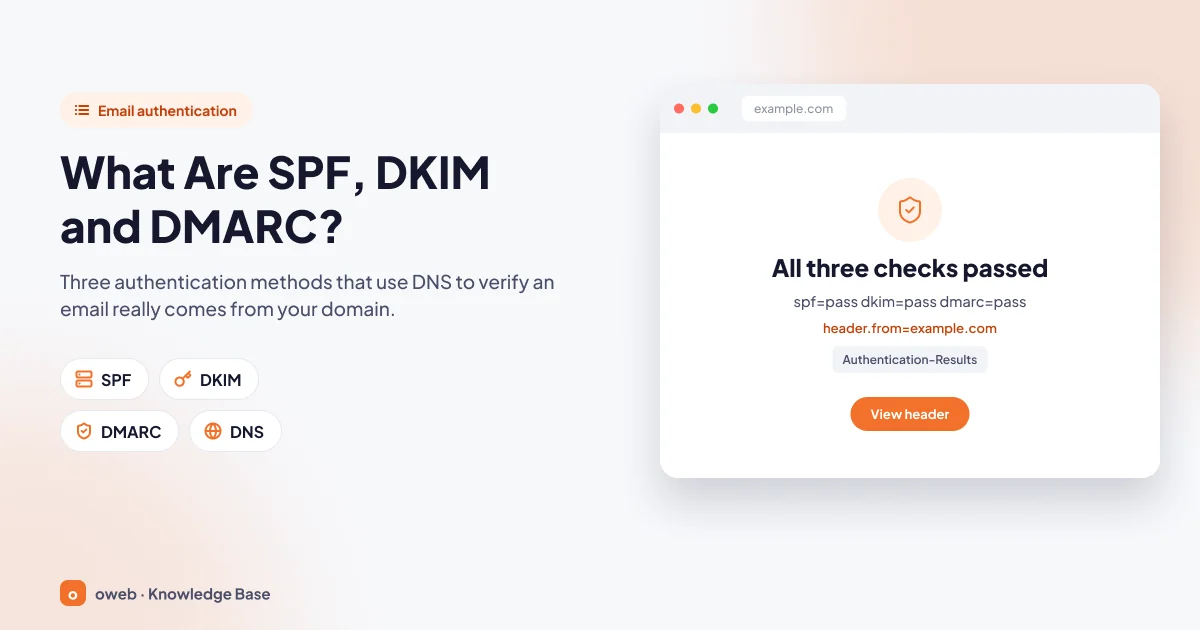
Summary: what do the three records do?
- SPF: A TXT record starting with
v=spf1that lists the servers authorized to send email on behalf of your domain. - DKIM: A digital signature added to outgoing messages; the receiver verifies it with the public key published in your DNS records. It does not encrypt the message.
- DMARC: A TXT record named
_dmarc; it requires the From domain to be aligned with SPF or DKIM, and defines a policy (none,quarantine,reject) and a reporting address. - A domain can have only one SPF record, and that record can trigger at most 10 DNS lookups.
- The safe order: SPF and DKIM first, then DMARC with
p=none, andquarantineandrejectonly once the reports show no problems. - Gmail and Yahoo (since February 2024) and Outlook.com (since May 2025) require bulk senders to use all three.
Why is email authentication necessary?
SMTP, the protocol that carries email, does not check whether the sender is who they claim to be. Every message contains two separate sender identities: the envelope sender used between servers (MAIL FROM, shown as Return-Path in the header) and the From address the recipient sees. Because the two can be written independently, an attacker can put your domain in the From field and send fake invoices to your customers. This is called email spoofing, and using it to steal information is called phishing.
Email authentication makes your domain harder to impersonate and helps receivers such as Gmail and Outlook trust your legitimate messages. If the records are missing, messages may be rejected or land in the spam folder; for other causes, see the email not sending error guide.
These records do not block lookalike domains with a single letter changed or messages that only spoof the display name, they do not encrypt messages, and they do not fix a poor sender reputation.
What is SPF and how does it work?
SPF (Sender Policy Framework) publishes in DNS the servers authorized to send email on behalf of your domain; the standard is RFC 7208. The receiver compares the connecting IP address with the SPF record of the domain in the envelope sender.
SPF does not look at the visible From address. An attacker can pass the SPF check with their own domain while showing your address in the From field; DMARC closes this gap.
What is an SPF record and how do you write one?
An SPF record is a TXT record added at the root of the domain (the record name is @ in most panels) and starts with v=spf1. An SPF record example:
v=spf1 a mx ip4:203.0.113.10 include:_spf.google.com ~allThe record is read from left to right: the server in the A record, the MX servers, the specified IPv4 address and Google Workspace are authorized; everyone else is treated as suspicious through ~all.
SPF mechanisms and qualifiers
ip4/ip6: Authorizes an IP address or range; requires no DNS lookup.a: Authorizes the addresses in the domain's A or AAAA record.mx: Authorizes the mail servers in the domain's MX record.include: Pulls another domain's SPF record into the evaluation; Google Workspace, Microsoft 365 and newsletter services are added this way.all: Matches everyone not matched earlier; it goes at the end of the record.
Each mechanism can be prefixed with a qualifier; if none is written, + is assumed.
| Qualifier | Result | Meaning |
|---|---|---|
+ | pass | Authorized sender (default) |
- | fail | Unauthorized; -all declares everyone not listed as unauthorized |
~ | softfail | Suspicious; the message is usually accepted but flagged |
? | neutral | No verdict is given; for testing only |
What is the difference between ~all and -all?
~all marks sources that are not listed as suspicious (softfail), while -all marks them as unauthorized (fail). Use ~all while you are identifying your sources. Some receivers apply a -all result at the SMTP stage without consulting DMARC, so even a forwarded message with a valid DKIM signature can be rejected. -all suits domains that send no email and domains whose owners are certain of all their sources.
SPF limits: one record and 10 DNS lookups
- One SPF record: If the same domain has two
v=spf1records, the result ispermerror; add the new service to the existing record instead. - 10 DNS lookups:
include,a,mx,ptr,existsandredirecttrigger lookups; if the total, including nestedincluderecords, exceeds 10, the result ispermerror.ip4,ip6andalldo not count. Do not use theptrmechanism; the standard advises against publishing it. A limit of two is also recommended for lookups that return empty answers, so do not leave theincludeentry of a service you have stopped using in the record. - Subdomains: An SPF record is not inherited from the parent domain; every subdomain that sends email needs its own record.
- Forwarding: When a message is forwarded through another server, the IP address changes and SPF often fails.
- Record type: Only TXT is used; the old "SPF" record type has been retired.
If you exceed the lookup limit, remove services you no longer use from the record, and move third-party sending such as newsletters to a subdomain with its own SPF record (each subdomain has its own lookup allowance). Replace include with IP addresses only for sources whose addresses never change; keep using include for services such as Microsoft 365 whose addresses can change. Having fewer than 10 include entries is not a guarantee on its own, because those records can be nested.
Multiple sources are combined in a single record (in this example, a hosting server, Google Workspace and Microsoft 365):
v=spf1 ip4:203.0.113.10 include:_spf.google.com include:spf.protection.outlook.com ~allWhat is DKIM and how does it work?
DKIM (DomainKeys Identified Mail) adds a digital signature belonging to your domain to every outgoing message (RFC 6376). The sending server signs selected headers and a hash of the body with a private key; the receiver retrieves the public key from DNS and verifies the signature.
DKIM does not encrypt the message; it only proves where the message came from and that it was not altered in transit. Because the signature travels with the message, it stays valid in forwarded messages as long as the content is unchanged; this is why DKIM should be enabled alongside SPF.
DKIM selectors and keys
The public key is stored in a TXT record named selector._domainkey.yourdomain.com. The selector lets you publish more than one key on the same domain, so each service can use its own key and keys can be rotated. cPanel and Plesk use the default selector, and Google Workspace uses google by default. Microsoft 365, on the other hand, requires two CNAME records named selector1._domainkey and selector2._domainkey; some newsletter services also publish DKIM through CNAME records.
The key should be at least 1024 bits; the recommended length is 2048 bits. Because of the 255-character limit on TXT strings, a 2048-bit key is split into quoted segments, and a key copied incompletely to an external DNS provider is a typical cause of a dkim=fail result.
How do you read the DKIM-Signature header?
The DKIM signature in an outgoing message looks like this:
DKIM-Signature: v=1; a=rsa-sha256; d=yourdomain.com; s=default;
  h=from:to:subject; bh=...; b=...
d= is the signing domain, s= the selector, h= the signed headers, bh= the body hash and b= the signature. You can find a service's selector from the s= value in a message sent through it.
What is DMARC and how does it work?
DMARC is the policy and reporting layer that ties SPF and DKIM results to the visible From address. The record is a TXT record named _dmarc.yourdomain.com that starts with v=DMARC1. A message passes DMARC if it passes at least one of the SPF or DKIM checks and the domain in the passing check is aligned with the From domain.
RFC 7489, which defined DMARC, was replaced in May 2026 by RFC 9989; because the version tag did not change, existing records keep working.
DMARC policies: none, quarantine and reject
The DMARC policy is set with the p= tag and tells the receiver what to do with messages that fail authentication.
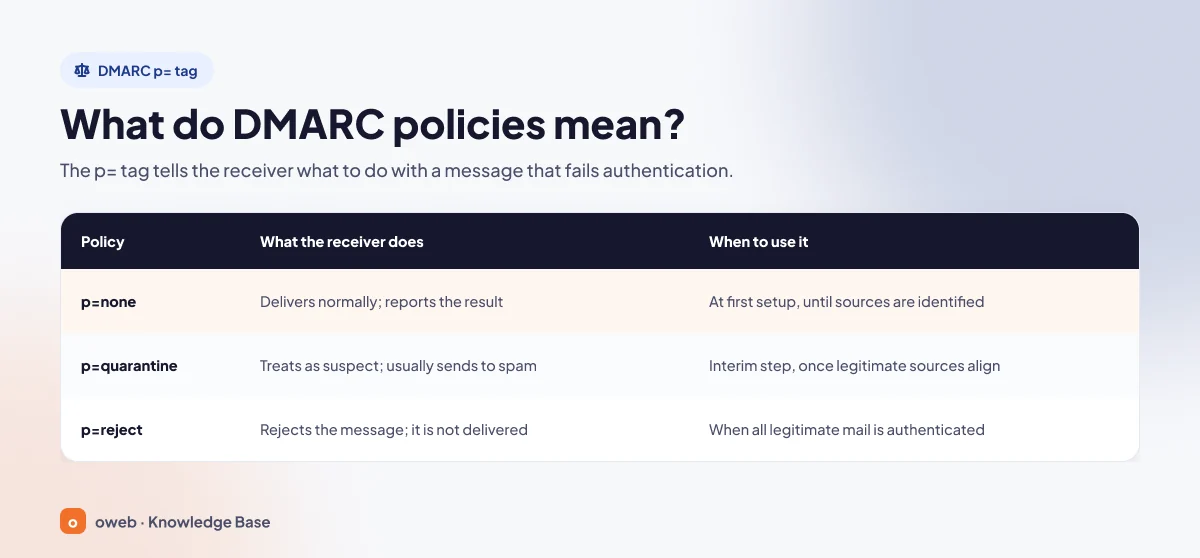
| Policy | What the receiver does | When to use it |
|---|---|---|
p=none | Takes no special action; the message is delivered normally and the result is written to the report. | During initial setup, until all sources have been identified from the reports. |
p=quarantine | Treats the message as suspicious; usually sends it to the spam folder. | As an intermediate stage once legitimate sources start passing with alignment. |
p=reject | Rejects the message; the sender usually receives a bounce. | When all legitimate sending is authenticated, and on domains that send no email. |
The record also covers subdomains that do not have their own _dmarc record. A different policy for subdomains is set with the sp= tag, and one for non-existent subdomains with the np= tag introduced in RFC 9989.
What is DMARC alignment?
Alignment means that the domain in the From address matches the authenticated domain: for SPF, the envelope sender is used; for DKIM, the d= value in the signature. In the default relaxed mode (adkim=r, aspf=r), the same organizational domain is enough, so bounce.yourdomain.com counts as aligned with yourdomain.com. In strict mode (s), the domains must match exactly.
A typical example on shared hosting: a WordPress contact form sends email with PHP mail(), and the domain in the envelope sender is often the server's hostname. Even if SPF passes, it passes for the server's domain and is not aligned with From; if the message is not signed with your domain's DKIM key either, DMARC fails. The fix is to send form emails through a real email account on your domain using SMTP authentication.
How do you read DMARC (rua) reports?
Receivers send aggregate reports, usually once a day in compressed XML format, to the address you specify in the rua= tag. A report shows how many messages were sent on behalf of your domain from which IP addresses, the SPF and DKIM results, and the action applied. Check three things in every report:
- Does the source IP address belong to a server or service you recognize?
- What are the SPF and DKIM results for that source, and does at least one pass aligned with the From domain?
- What action did the receiver apply to the message?
Raw XML is hard to read, so use a separate mailbox or a report analysis tool. Google and Microsoft 365 do not send the per-message ruf= reports; rua is sufficient.
If the reporting address is on a different domain, a TXT record named yourdomain.com._report._dmarc.report-domain.com with the value v=DMARC1 must be added to that domain's DNS zone; otherwise receivers ignore the address.
Is the pct tag still used?
The pct= tag in the old standard specified the percentage of messages the policy applied to. RFC 9989 removed this tag and introduced the t=y test mode instead: t=y asks the receiver to apply the published policy one level more leniently (quarantine instead of reject, no action instead of quarantine). Because receivers ignore tags they do not recognize, records containing pct do not break; however, a receiver following the new standard may disregard the value. If your record contains p=reject; pct=10, assume the policy may be applied to all messages.
As of November 2026, Google and Microsoft documentation and some panel forms (for example, the Percentage field in the cPanel Zone Editor) still show this tag. Even so, do not base a new rollout plan on the pct tag.
Differences between SPF, DKIM and DMARC, and how they work together
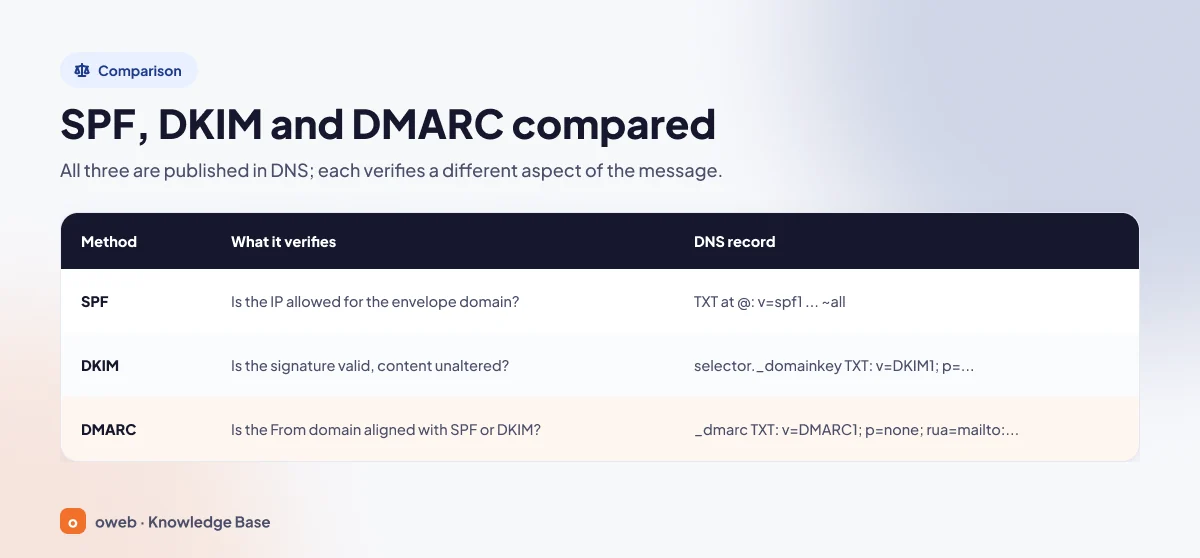
| Method | What it verifies | DNS record |
|---|---|---|
| SPF | Is the sending server's IP address authorized to send email on behalf of the domain in the envelope sender? | TXT at the domain root (@): v=spf1 ... ~all |
| DKIM | Was the message signed with the private key of the signing domain (d=), and were the signed headers and body left unchanged in transit? | TXT named selector._domainkey: v=DKIM1; k=rsa; p=... |
| DMARC | Is the From domain aligned with the domain authenticated by SPF or DKIM; if not, what should the receiver do, and where should reports go? | TXT named _dmarc: v=DMARC1; p=none; rua=mailto:... |
This is what happens to a message on the receiving server:
- The receiver compares the SPF record of the domain in the envelope sender with the connecting IP address.
- It finds the public key using the
d=ands=values in theDKIM-Signatureheader and verifies the signature. - It reads the
_dmarcrecord of the From domain: if either the SPF or DKIM check passed with alignment, the message passes DMARC and continues to regular spam filtering; if not, the policy is applied. In both cases the result is written to the report.
SPF, DKIM and DMARC record examples
The three records below show a typical starting setup for yourdomain.com.
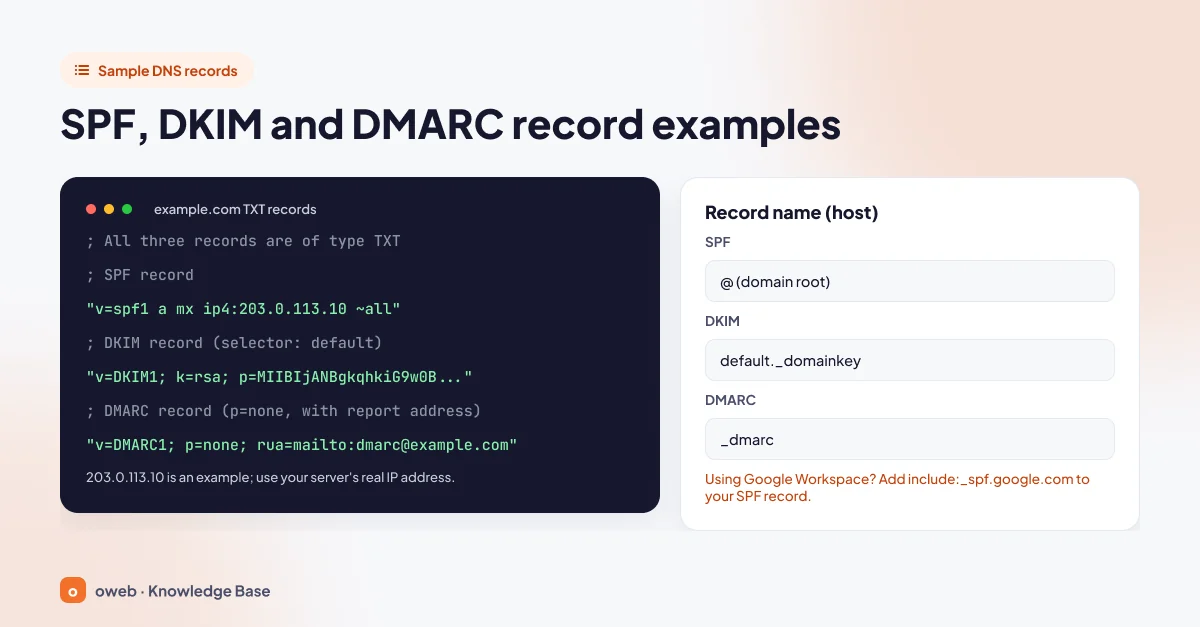
yourdomain.com.                     TXT  "v=spf1 a mx ip4:203.0.113.10 include:_spf.google.com ~all"
default._domainkey.yourdomain.com.  TXT  "v=DKIM1; k=rsa; p=MIIBIjANBgkqhkiG9w0BAQEFAAOCAQ8A..."
_dmarc.yourdomain.com.              TXT  "v=DMARC1; p=none; rua=mailto:[email protected]"
The record name (host) is @ for SPF, default._domainkey (selector + ._domainkey) for DKIM and _dmarc for DMARC. The quotation marks and trailing dot are zone file notation; in panel forms you usually enter the value without quotes. The p= value in the DKIM record is a shortened public key in this example.
Do not copy the examples as they are. 203.0.113.10 is an address reserved for documentation; get your server's real IP address and DKIM key from your hosting panel. Add the include:_spf.google.com part only if you use Google Workspace.
Domains that never send email (parked domains) can also be spoofed; lock them down with these two records:
yourdomain.com.         TXT  "v=spf1 -all"
_dmarc.yourdomain.com.  TXT  "v=DMARC1; p=reject;"
How do you set up SPF, DKIM and DMARC?
Setup consists of six steps, and the order matters; dmarc.org and RFC 9989 recommend a similar order.
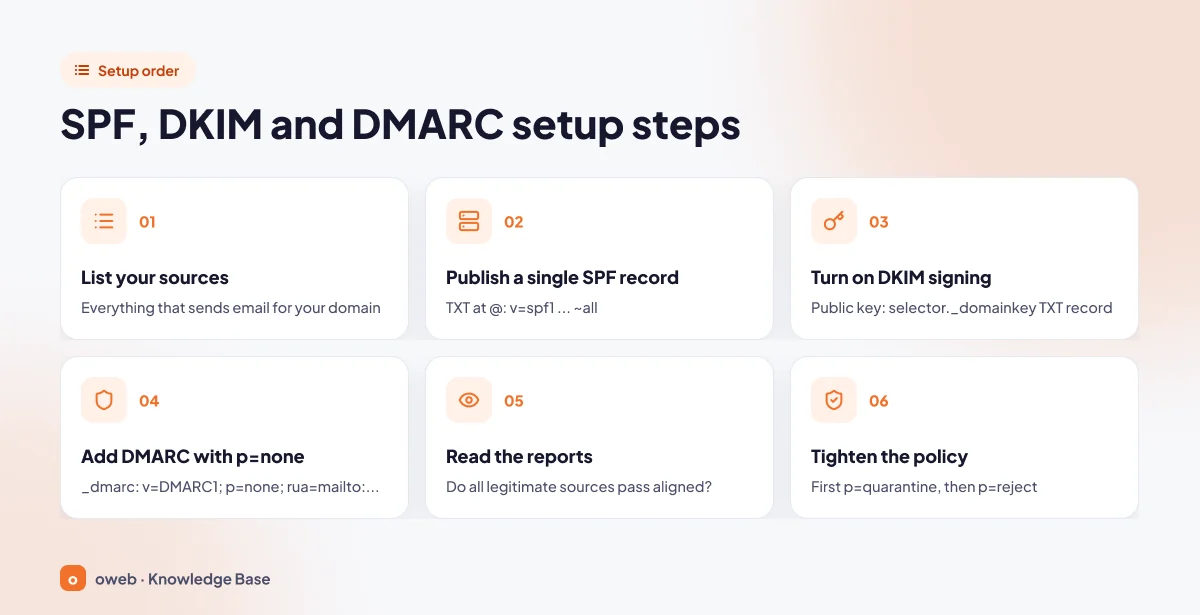
Before changing DNS records, copy your existing TXT records to a text file or export the DNS zone. A faulty SPF record affects all of your outgoing mail; with a backup, you can revert to the old value immediately.
1. List your sending sources
Write down everything that sends email on behalf of your domain: the hosting server, Google Workspace or Microsoft 365, newsletter and CRM services, invoicing software and website forms. Every forgotten source means rejected messages once the policy is tightened.
2. Publish a single SPF record
If the domain already has a v=spf1 record, edit it; otherwise add a single TXT record at the domain root. Add each source with ip4, a, mx or include and end the record with ~all. How to add the record in cPanel, Plesk and Cloudflare is explained in the panel section below.
3. Enable DKIM signing
Enable DKIM separately for each source: in your hosting panel, in the Google Workspace Admin console (Authenticate email, then Start authentication) and in third-party services. You add the selector and public key provided by the service to your DNS records as a TXT record.
4. Add the DMARC record with p=none
First create the mailbox that will receive the reports (for example, [email protected]); do not use the address you use every day, because every receiver that sends reports sends a separate message. Once SPF and DKIM are working (Google recommends waiting 48 hours), add the following record under the name _dmarc. If your panel has already created a DMARC record, do not add a second one; edit the existing record.
v=DMARC1; p=none; rua=mailto:[email protected]p=none is a temporary monitoring stage. A p=none record without a reporting address provides neither protection nor visibility.
5. Read the reports
In the aggregate reports, look for the answer to one question: do all of your legitimate sources pass SPF or DKIM with alignment? Fix the ones that do not. An IP address you do not recognize can be one of three things: a legitimate service you forgot to list, a server forwarding your message to another address (SPF fails, DKIM passes) or a spoofing attempt. If both SPF and DKIM fail and you do not recognize the source, it is most likely spoofing; check who owns the IP address before deciding.
6. Tighten the policy
Once no legitimate source appears as failing in the reports, change p=none to p=quarantine first and then to p=reject; the timeline is explained below.
How do you add the records in cPanel, Plesk and Cloudflare?
First, find out where your DNS records are managed
The records must be published on your domain's authoritative name servers (NS). If your name servers point to an external provider such as Cloudflare or to your domain registrar, records you add in the hosting panel have no effect. You can check your NS and TXT records with the DNS lookup tool.
Steps by panel
cPanel: Email Deliverability
If your hosting account uses the cPanel control panel, the Email Deliverability tool shows problems in your email-related DNS records on a single screen (it is visible if your hosting provider has enabled it).
- Open Email Deliverability in the Email section.
- Click Repair next to the domain with a problem. Review the suggested records in the window that opens; check that the
includeentries of the third-party services you use are still present in the SPF suggestion, then confirm. The check can take up to five minutes to refresh. If DNS is not managed on this server, the button is unavailable. - To proceed manually, go to the Manage page; the suggested DKIM and SPF records can be copied with Copy.
- To add a source to the SPF record, fill in the Include List or IP fields under Customize and click Install a Customized SPF Record. cPanel suggests
~allby default. - According to the cPanel documentation, current versions include a DMARC section and an Install the Suggested Record button on the same screen. If you do not see it, select the DMARC type from the Add Record menu on the domain's Manage page in the Zone Editor.
Plesk: Mail Settings and DNS Settings
- Under Websites & Domains, open the Mail Settings page from the domain's Mail tab.
- Select the Use DKIM spam protection system to sign outgoing email messages checkbox and save. If DNS is managed in Plesk, the
default._domainkeyrecord is added automatically. - If DNS is managed by another provider, copy the records shown under the How to configure external DNS link on the same screen to your DNS provider.
- For SPF and DMARC, open the domain's DNS Settings page (in the new interface it may be under the Hosting & DNS tab). Edit the existing record; if there is none, add a TXT record with Add Record.
According to the Plesk documentation, the default DNS template creates the SPF record with -all and the DMARC record with strict alignment and p=quarantine (your hosting provider may have changed this). If you are going to use third-party services, review these values first.
Cloudflare and other external DNS providers
- Copy the SPF value and the DKIM public key from your hosting panel.
- In Cloudflare, click Add record on the domain's DNS Records page and select TXT as the Type.
- In the Name field, enter
@for SPF, for exampledefault._domainkeyfor DKIM and_dmarcfor DMARC; paste the value into the content field and click Save. - Confirm that only one
v=spf1record remains at the domain root.
Proxy status exists only for A, AAAA and CNAME records; leave the records of services that publish DKIM through CNAME, as well as mail server names, as "DNS only". Details are in the Cloudflare DNS documentation. The logic is the same in your domain registrar's DNS panel: type TXT, then name and value.
If you are unsure, stop before deleting any record; Oweb customers can open a support ticket to have their existing records checked.
How do you test SPF, DKIM and DMARC records?
DNS lookups with dig and nslookup
From the terminal on macOS and Linux:
dig +short TXT yourdomain.com
dig +short TXT default._domainkey.yourdomain.com
dig +short TXT _dmarc.yourdomain.com
From the Command Prompt on Windows (the last line is the PowerShell option):
nslookup -type=TXT yourdomain.com
nslookup -type=TXT default._domainkey.yourdomain.com
nslookup -type=TXT _dmarc.yourdomain.com
Resolve-DnsName -Name "_dmarc.yourdomain.com" -Type TXT
In the first query you should see only one line starting with v=spf1, and in the third only one line starting with v=DMARC1. If your selector is different, use it instead of default. If dig is not installed, install your distribution's dnsutils or bind-utils package. To bypass the local cache, you can send the query to a public resolver:
dig +short TXT _dmarc.yourdomain.com @1.1.1.1
nslookup -type=TXT _dmarc.yourdomain.com 1.1.1.1
The Authentication-Results line in the email header
The most reliable test is sending a real message. Send an email from your domain to a Gmail address; then, in the message, click Show original from the More menu next to the Reply button. For other email clients, Google's page on viewing headers explains the steps. Look for a section like this:
Authentication-Results: mx.receiving-server.com;
  spf=pass smtp.mailfrom=yourdomain.com;
  dkim=pass header.d=yourdomain.com;
  dmarc=pass header.from=yourdomain.com
smtp.mailfrom shows the domain verified by SPF, header.d the domain in the DKIM signature and header.from the visible From domain. If neither of the first two matches the third, there is an alignment problem.
What do the results mean?
| Result | Possible cause | Solution |
|---|---|---|
spf=none | No SPF record | Add a single v=spf1 record at the domain root |
spf=softfail / fail | The sending IP or service is not in the record | Add the source with ip4 or include |
spf=permerror | Two SPF records, more than 10 lookups or a syntax error | Merge the records and reduce the lookup-generating terms |
dkim=none | DKIM signing is not enabled | Enable DKIM in the panel or the service |
dkim=fail | The key in the DNS record is wrong or truncated, or the content was altered in transit | Copy the public key again and check the selector |
dmarc=fail (with spf=pass) | The From domain is not aligned | Send via SMTP with your own domain, and enable custom DKIM signing for your domain in the service |
What are the Gmail, Yahoo and Outlook.com sender requirements?
These records are not a legal requirement; however, major providers have treated authentication as a precondition for delivery since February 2024. If emails are going to spam or bouncing, this is the first place to look.
| Provider | All senders | Bulk senders |
|---|---|---|
| Gmail (personal accounts) | SPF or DKIM, valid reverse DNS (PTR), TLS, spam rate below 0.3% | 5,000 or more messages per day: SPF, DKIM and DMARC (p=none is enough), From alignment, one-click unsubscribe |
| Yahoo | SPF or DKIM, valid reverse DNS, spam rate below 0.3% | SPF and DKIM together, DMARC of at least p=none, From alignment (no numeric threshold has been published) |
| Outlook.com, Hotmail, Live | The announced requirements cover bulk senders | Since May 5, 2025, more than 5,000 messages per day: SPF and DKIM must pass, and DMARC must be at least p=none and aligned |
The Gmail requirements apply to messages sent to personal Gmail accounts (@gmail.com, @googlemail.com). Gmail can reject unauthenticated messages with a 5.7.26 error or mark them as spam (Google's sender guidelines). On Outlook.com, non-compliant bulk mail lands in the Junk Email folder or bounces with error 550 5.7.515. These are the requirements as of November 2026; even for small senders, delivery is not reliable without SPF and DKIM.
How do you tighten the DMARC policy gradually?
- Monitoring (
p=none): Google recommends monitoring reports for at least a week, while RFC 9989 recommends that domains aiming forp=rejectstay at this stage for at least a month. - Quarantine (
p=quarantine): Once all legitimate sources pass with alignment, change the policy and monitor for a similar period. - Reject (
p=reject): If no legitimate source appears as failing in the reports, move to the final step.
v=DMARC1; p=quarantine; rua=mailto:[email protected]
v=DMARC1; p=reject; rua=mailto:[email protected]p=reject offers the strongest protection, but it is not mandatory for everyone. RFC 9989 recommends against using p=reject on domains whose users post to mailing lists, because mailing list software can modify messages and break authentication.
Common setup mistakes
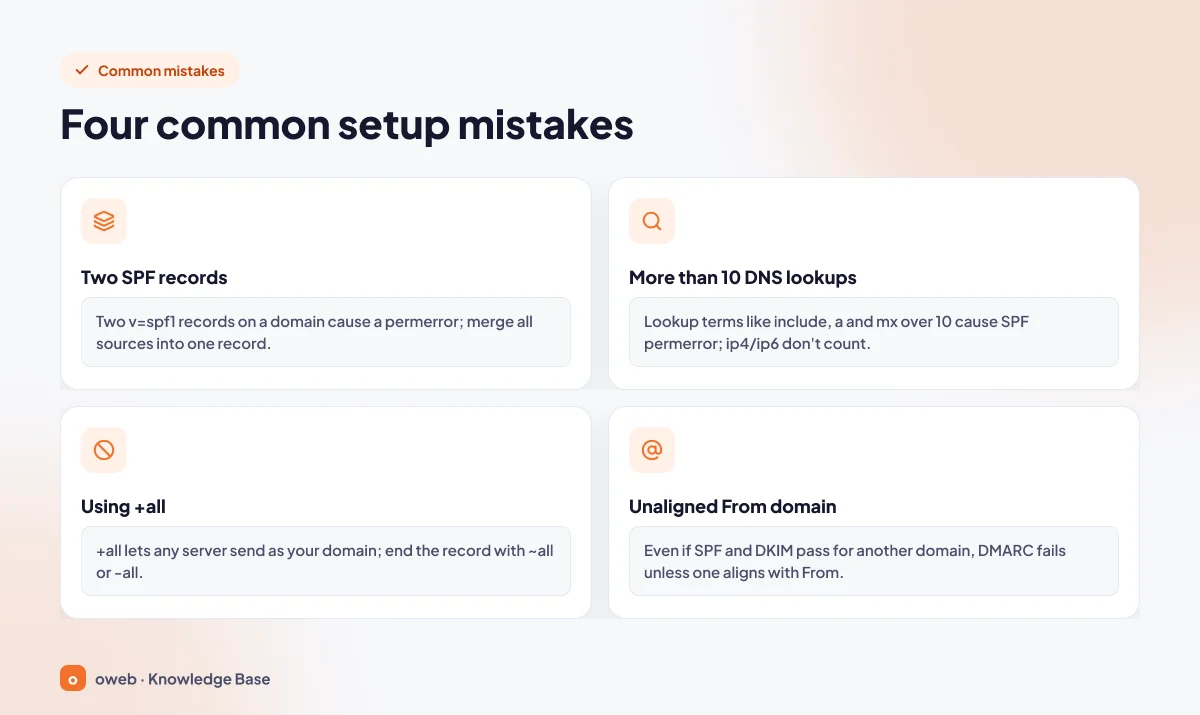
- Two SPF records: The result is
permerror; combine all sources into a single record. - More than 10 DNS lookups: If the total of lookup-generating terms such as
include,aandmxexceeds 10, the SPF result ispermerror. - Using +all: It allows any server to send on behalf of your domain; end the record with
~allor-all. - Misaligned From domain: Even if SPF and DKIM pass for another domain, DMARC fails if they are not aligned with From.
- Two DMARC records: There must be only one TXT record named
_dmarc; if the panel has added one, edit it instead of adding a new one. - Typos: Writing
include=instead ofinclude:, leaving a space after the colon, or writingipv4:instead ofip4:. - Switching to
p=rejectwithout reading reports: Messages from a forgotten form or invoicing service are rejected without anyone noticing.
What are BIMI and ARC?
BIMI displays your brand logo next to authenticated messages. Its prerequisite is a DMARC policy of p=quarantine or p=reject; Gmail also requires a VMC or CMC brand certificate.
ARC (RFC 8617) lets intermediate servers that forward a message pass on the authentication results they saw in signed headers, so the receiver can see that a message whose SPF check broke during forwarding originally passed authentication. ARC is an experimental standard implemented by forwarding servers; as a domain owner, you do not need to configure anything.
Frequently asked questions
Are SPF, DKIM and DMARC all necessary?
They are not a legal requirement, but in practice all three are necessary. Gmail requires at least SPF or DKIM from every sender and all three from bulk senders. SPF breaks with forwarding but DKIM stays valid; neither protects the From address, but DMARC does.
Is DMARC p=none enough?
It is enough to meet bulk sender requirements, but it does not stop spoofing. p=none only collects reports; protection begins with p=quarantine or p=reject.
Why does DMARC fail even though SPF and DKIM pass?
Because both passed for a domain different from the one in your From address. Compare the smtp.mailfrom and header.d values in the header with header.from; if they do not match, enable custom DKIM signing for your domain in your newsletter or CRM service. Microsoft's DMARC documentation explains this scenario with sample headers.
Can a domain have two SPF records?
No. If the same domain has more than one v=spf1 record, the SPF result is permerror; combine all sending sources into a single record.
Does a domain that sends no email need SPF and DMARC?
Yes. These domains can also be spoofed; lock them down with the v=spf1 -all and v=DMARC1; p=reject; records.
How long does it take for the records to become active?
Depending on the record's TTL value, changes usually propagate within a few minutes to a few hours. Google states that SPF and DKIM can take up to 48 hours to take effect. While you wait, use dig or nslookup to confirm that the record has been published.
My records are correct, so why are my emails still going to spam?
Authentication is necessary but not sufficient on its own. Sender reputation, the IP address's reverse DNS record, content and spam complaints also affect the outcome. First confirm that all three results in the header are pass.
Conclusion
When SPF, DKIM and DMARC are set up together, your domain becomes harder to impersonate and your legitimate messages reach the inbox more reliably. Publish a single SPF record, enable DKIM, start DMARC with p=none and a reporting address, and tighten it once the reports show no problems; back up your DNS records before every change.
If you want to work with addresses on your own domain, take a look at Oweb's corporate email page, and write to our support team whenever you get stuck.
